Skills are the reusable building blocks of the GitHub Copilot harness. A skill is a Markdown file, and it can carry supporting files with it.
In this post lets build a skill package from scratch, upload it to an agent, and watch the agent load it on demand. We will use a Root Cause Analysis writer as the example.
The finished package is on GitHub, RajeevPentyala/contoso-rca-writer. You can download the ZIP and upload it as is.
This is the fourth post in the series. The earlier ones cover the harness itself, natural language authoring, and an agent calling a workflow.
What is a ‘Skill’?
A skill is a reusable capability that extends what your agent can do.
- A skill has a name, a description, and instructions written in Markdown.
- The orchestration runtime activates it by matching the user request against the description.
- It is not a connector. Skills are self contained, while tools reach out to external services.
- You can export a skill as a Markdown file or as a package, then add it to another agent.
How a Skill differs from Instructions and Knowledge
| Component | Purpose |
|---|---|
| Instructions | General agent behavior and personality |
| Knowledge | Data the agent can reference |
| Tools | Actions through external services |
| Skills | Reusable task specific capabilities, Markdown based |
Lets look at the problem a skill actually solves.
Why Skills?
- Every organization has a few repetitive tasks with a fixed output format. A post incident Root Cause Analysis is a good example. There is a mandated section order, a severity rubric, and a house style for the wording.
- You can paste all of that into the Instructions box. It works, but instructions are the one component that is always loaded in full. Somebody asking about a printer still carries the whole incident procedure.
- A skill is different. The runtime activates it based on the user message and the skill description, so the rules stay out of the way until they are needed.
Prerequisites
- An agent created with the GitHub Copilot harness in Copilot Studio. Every skills article lists this as the prerequisite. In my tenant the harness sits behind the New experience toggle.
- Copilot Credits allocated to your environment. Building, testing, and running agents on this harness consumes credits.
- A text editor and a zip utility.
Note: Skills are a GitHub Copilot harness capability. On the standard harness you shape behavior with topics and triggers instead.
Lets start by building the package on our local machine.
Build the Skill package
- A skill package is a ZIP file. The ZIP must include a
SKILL.mdfile. Everything else is optional. - Our package will carry three reference files alongside
SKILL.md.
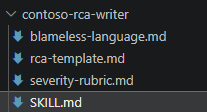
Why split into four files?
SKILL.mdholds the procedure. It tells the agent what steps to follow.rca-template.mdholds the mandated section structure.severity-rubric.mdholds the SEV1 to SEV4 thresholds and the tie break rules.blameless-language.mdholds the phrasings to prefer and the ones to avoid.
Create SKILL.md
The file starts with YAML front matter. Only name and description are needed.
Important: The name must use lowercase letters, numbers, and hyphens only. It cannot start or end with a hyphen.
---name: contoso-rca-writerdescription: Writes a post-incident Root Cause Analysis (RCA) in the mandated Contoso format. Activate this skill whenever the user asks for an RCA, a postmortem, an incident report, an outage write-up, or asks to assign a severity level to an incident. Contoso RCA WriterYou produce post-incident Root Cause Analysis documents that follow the Contosoincident management standard. Reference filesRead these bundled files before you write anything. They are the source of truth. rca-template.md - the mandated section structure and section order. severity-rubric.md - SEV1 to SEV4 definitions, examples, and review SLAs. blameless-language.md - phrasings to prefer and phrasings to avoid. How to write an RCA Gather the facts you were given. Assign a severity by scoring against severity-rubric.md. Build the timeline as a UTC table, oldest first. Separate root cause from contributing factors. Write corrective actions with an owning team and a target date. Apply blameless language. Emit the document, following rca-template.md exactly. Edge cases Not enough information. Write the RCA anyway. Put Not supplied in any field you cannot fill. Never fabricate a timestamp or an error rate. The user asks for something that is not an RCA. Do not use this skill.
Three parts to notice.
- The front matter is the only required piece. Everything below it is plain Markdown.
- The
descriptionis what the runtime matches against, so it lists the words a user might actually type. - The instructions point at the reference files by filename. That is how I wired the four files together.
The full version of this file is in the GitHub repo.
Create the reference files
- Each reference file is plain Markdown, and there is no required structure.
- Ours hold a section template, a severity table with tie-break rules, and a table of phrasings to avoid.
- Here is a small part of the severity rubric.
SEV1 - Critical| Dimension | Threshold || --- | --- || Customer impact | More than 25 percent of requests failing || Data | Any confirmed data loss, corruption, or unauthorized exposure | Tie-break rules Impact percentage always beats duration. Any confirmed data loss or data exposure is SEV1, with no exceptions.
Zip the package
Select the four files and compress them. Do not compress the parent folder.
Tip: Keep
SKILL.mdat the top level of the ZIP. I zipped the four files directly, and that uploaded cleanly.
Get the package from GitHub
If you would rather not build the files by hand, the finished package is public here.
Tip: The content uses Contoso sample data. Edit
severity-rubric.mdto match your own severity bands, andblameless-language.mdto match your house style. Leave thenameanddescriptionin the front matter alone, since the runtime uses the description to decide when to activate the skill.
Now we have the package ready. Lets create the agent and give it the skill.
Create the Agent
- Create a new agent on the GitHub Copilot harness and name it
IT Support Assistant. - Copy and paste following Instructions
You are the Contoso IT Support Assistant. You help employees with IT questions suchas password resets, VPN access, device enrolment, printer problems, softwarerequests and mailbox issues. Be friendly, concise and practical.Answer in plain language and keep replies short. If a request needs a specialistteam, say which team to contact.
Add the Skill to the Agent
- In the components panel, select Skills. In my tenant this is the plus icon next to the Skills heading.
- In Add skill, select Upload a skill.
- Drag the ZIP onto the upload box, or select the box and browse to it.

Tip: The same dialog also offers Generate with AI and Create from blank. Use those when you want to author the skill inside Copilot Studio instead of a text editor.
The skill now appears as a chip under Skills.

Now lets test it.
Test the Agent
- Open the Preview tab and paste an incident description.
Write an RCA for this incident. Checkout service returned HTTP 500 for 38% of requests between 14:02 and 14:37 UTC on 15 July 2026. A config change to the payment gateway timeout was deployed at 13:58. An alert fired at 14:11. We rolled back at 14:35 and confirmed recovery at 14:37.
- Watch the response as it streams. The agent announces the skill by name before it writes anything.

- Two lines matter here.
Loading skill: contoso-rca-writeris the orchestrator selecting our skill and naming it.I'll read the reference files firsttells us it is going after the bundled files.
- The rules were absent until the request asked for them. That is what makes a skill different from a paragraph in the Instructions box.
- Agent responded and also produced a downloadable Markdown file.

- The generated .md file will be as per the
rca-template.mdwhich is our Skill reference file.

Summary
- A skill is a Markdown file with YAML front matter, and it can ship with reference files in a ZIP.
- The ZIP must include
SKILL.md. Keep it at the top level. - The
descriptionline decides when the runtime activates the skill, so write it with the words a user would type. - Skills load when the request matches them
We built one agent here. The real payoff comes later, because the same ZIP can be uploaded to any other agent that needs the standard. Create once, add to many.
All four files and the ready to upload ZIP are here, RajeevPentyala/contoso-rca-writer. The repo README covers the upload steps and a test prompt.
Official documentation is here, Skills overview and Create a skill.
🙂

Leave a Reply