In this post, I’ll show you how to build a C# console app using the Microsoft Agent Framework (MAF) — with streaming, function tools, and multi-turn memory — powered by a free AI model via OpenRouter.
What is Microsoft Agent Framework?
Microsoft Agent Framework (MAF) is a pro-code SDK for building AI agents in C# and Python.
If you’ve used Semantic Kernel or AutoGen before (I’ve written about Semantic Kernel in my Getting Started with Semantic Kernel and RAG Chat App posts), here’s the important update:
What happened to Semantic Kernel and AutoGen?
- MAF is the unified successor to both Semantic Kernel and AutoGen
- Microsoft merged AutoGen’s multi-agent abstractions with Semantic Kernel’s enterprise features (session management, type safety, middleware, telemetry) into a single framework
- Both Semantic Kernel and AutoGen are now in maintenance mode — only receiving bug fixes and security patches going forward
- Existing Semantic Kernel projects will continue to work — Microsoft provides a migration path and will support SK for at least one year after MAF’s GA
- For new projects, the recommendation is to start with Agent Framework
What MAF brings together:
- Build agents that can call your code autonomously (function tools)
- Built-in multi-turn conversation memory (sessions)
- Works with any OpenAI-compatible model (Azure, OpenAI, OpenRouter, Ollama)
- Code-first — full control over model, tools, and orchestration
- Support for modern protocols like MCP (Model Context Protocol) and A2A (Agent-to-Agent)
- Available as NuGet package:
Microsoft.Agents.AI.OpenAI
Official docs: Microsoft Agent Framework — MS Learn
Now that we know what MAF is, let’s get the prerequisites ready before we run the sample.
Prerequisites
- .NET 9+ SDK installed
- Free OpenRouter API key (I’ll show you how to get one below)
- VS Code or any code editor
Get Your Free OpenRouter API Key
- Go to https://openrouter.ai/settings/keys
- Sign up (free) and click Create Key
- Copy the key — you’ll paste it into the config file later
For a step-by-step guide on getting an OpenRouter API key, refer to my previous blog post. If you already have one, reuse it!
Now let’s set up the project and run it.
Set Up the Project
I’ve published the complete source code on GitHub.
- Clone the repo: https://github.com/RajeevPentyala/MicrosoftAgentFrameworkDemo
- Navigate to
samples/01-hello-agent-streaming-tools/ - Copy
appsettings.jsonasappsettings.Development.json - Paste your OpenRouter API key in
appsettings.Development.json
{ "OpenRouter": { "ApiKey": "sk-or-v1-your-key-here", "Model": "nvidia/nemotron-3-super-120b-a12b:free", "Endpoint": "https://openrouter.ai/api/v1" }}
Run the app:
cd samples/01-hello-agent-streaming-toolsdotnet run
The app shows a menu with 3 demos. Let’s explore each one.

Demo 1: Streaming Chat
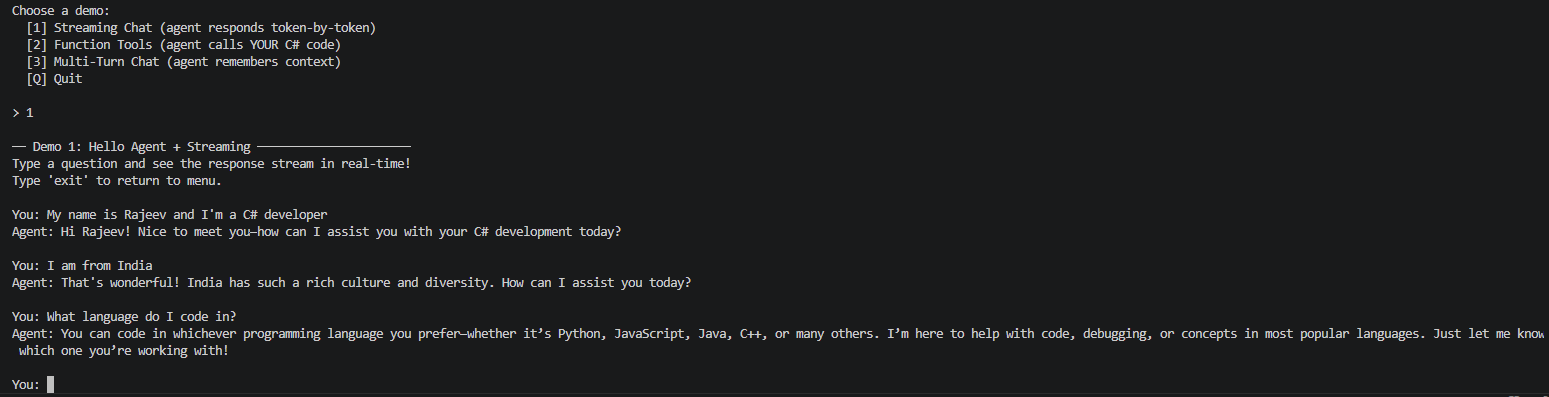
This is the simplest demo — you type a question, and the agent’s response streams token-by-token in your terminal (like ChatGPT’s typing effect).
In MAF, streaming is just:
await foreach (var chunk in agent.RunStreamingAsync(userInput)){ Console.Write(chunk);}
That’s it. One line gives you live streaming. MAF handles the underlying HTTP stream parsing for you.
Streaming is cool, but the real power of an agent is acting on your behalf. Let’s see that next.
Demo 2: Function Tools
The agent can autonomously call your C# methods based on what the user asks — no routing logic, no intent detection, no if-else chains.
I defined two simple mock functions in the project:
GetCurrentWeather(city)— returns weather data for a cityGetMyTasks()— returns today’s task list
The magic is in how you register them with the agent:
AIAgent agent = chatClient.AsAIAgent( instructions: "You are a helpful personal assistant...", name: "ToolAgent", tools: [ AIFunctionFactory.Create(DemoTools.GetCurrentWeather), AIFunctionFactory.Create(DemoTools.GetMyTasks) ]);
Key MAF Concept:
AIFunctionFactory.Create()wraps any C# method into an AI-callable tool. The agent reads the method name and its[Description]attribute to decide when to call it.
Note: Not all free/small models support function calling. The NVIDIA model (
nemotron-3-super-120b-a12b:free) we’re using does support it — that’s why I picked it. If you swap to a different model and tools stop working, check if that model supports function calling.
Now when a user asks “What’s the weather in Seattle?”, the agent autonomously decides to call GetCurrentWeather("Seattle") — no manual routing code needed!
Try these prompts:
| Ask the agent | What happens |
|---|---|
| “What’s the weather in Seattle?” | Agent calls GetCurrentWeather("Seattle") |
| “Do I have any tasks today?” | Agent calls GetMyTasks() |
| “Weather in London and show my tasks” | Agent calls BOTH tools in one turn! |
| “Tell me a joke” | Agent responds directly — no tools needed |
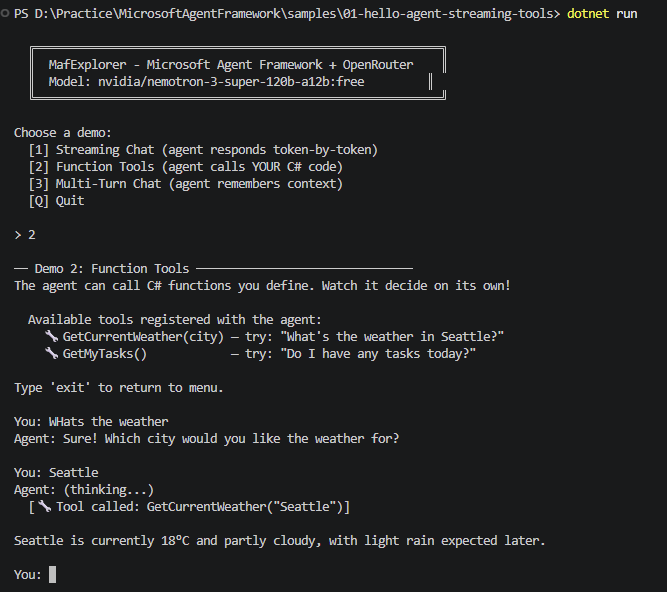
Without writing any tool-routing logic yourself, the agent figures out which function to call, executes it, and uses the result to respond. MAF does all of this automatically.
Now let’s see how the agent handles memory across multiple messages.
Demo 3: Multi-Turn Chat with Memory
In a typical chat API call, each request is independent — the model doesn’t remember what you said before. MAF solves this with sessions.
In MAF, you just create a session:
var session = await agent.CreateSessionAsync();await foreach (var chunk in agent.RunStreamingAsync(userInput, session: session)){ Console.Write(chunk);}
Key MAF Concept:
CreateSessionAsync()creates an in-memory session that stores the full conversation history. Passsession:to each call and the agent remembers everything.
Try this sequence to test:
You: My name is Rajeev and I'm a C# developerYou: I am from IndiaYou: What's my name and where am I from? ← Agent remembers both!You: What language do I code in? ← Still remembers!
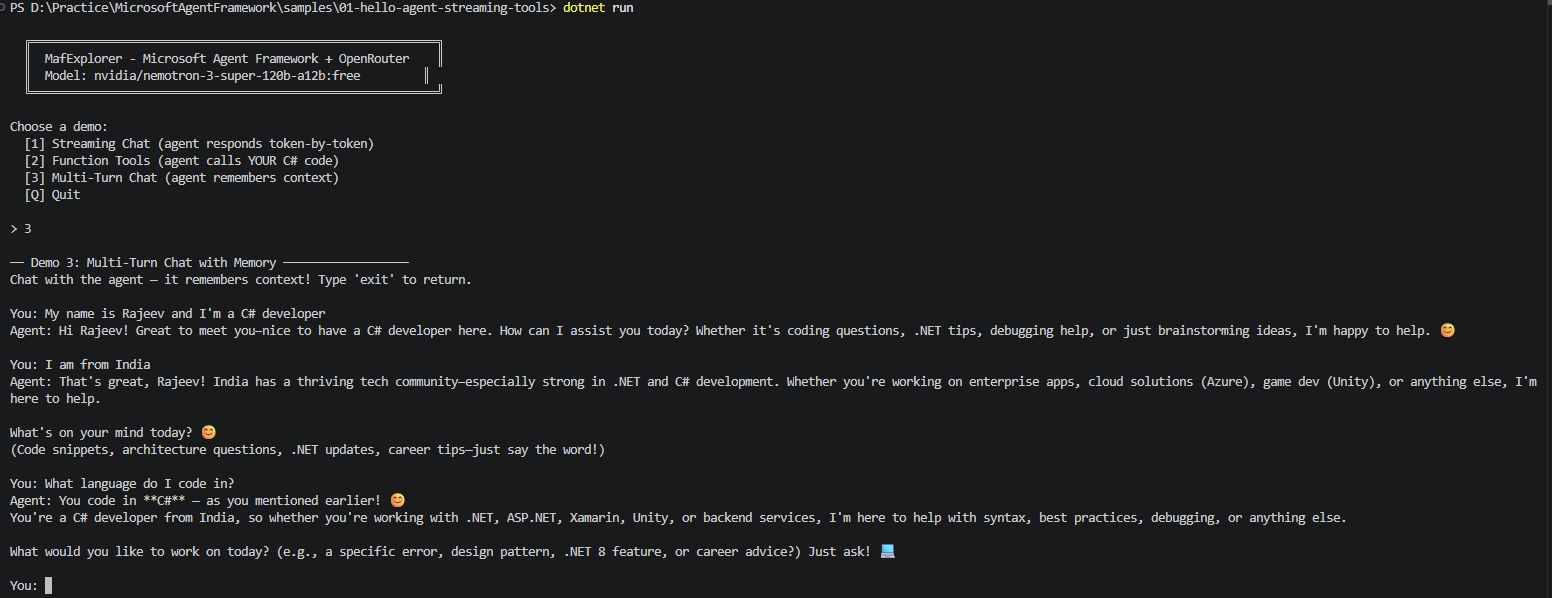
Without the session: parameter, each call would be independent — the agent would forget everything. With it, MAF handles the conversation history automatically.
Now that we’ve seen MAF in action, let’s compare it with the low-code option many of us already use.
Agent Framework vs Copilot Studio — When to Use Which?
If you’re familiar with Microsoft Copilot Studio, here’s a simple way to think about it:
| Aspect | Copilot Studio | Agent Framework |
|---|---|---|
| Build | Drag-and-drop, low-code | C# code-first |
| Hosting | SaaS (Power Platform) | Azure, custom apps, on-prem |
| Model Control | Platform-managed | You choose the model |
| Multi-Agent | Limited | Full support |
| Best for | Business users, quick bots | Developers, complex agent logic |
Use Copilot Studio when you need a quick conversational bot with Power Platform integration. Use Agent Framework when you need full control over the model, tools, orchestration, and hosting.
The full source code is on GitHub: https://github.com/RajeevPentyala/MicrosoftAgentFrameworkDemo
Official docs: Microsoft Agent Framework — MS Learn
Give it a try and let me know what you think! 🙂



Leave a Reply