-
Continue reading →: The specified organization already has an active Website Binding for this site – Dynamics 365 Portals
We have 2 Portal solutions (i.e., Partner Portal and Custom Portal) enabled in our CRM organization and when I tried to configure ‘Custom Portal’ in a Web App, I could not, as the “Adxstudio Portals Website” drop down was disabled and defaulted to ‘Partner Portal’. Reason: ‘Partner Portal’ solution configured…
-
 Continue reading →: (Step By Step) Surface Power BI Reports in Dynamics CRM Dashboard
In this article, I am going to provide ‘Step-by-Step’ details on how to: Add ‘Power BI’ subscription to your existing Office 365 Connect to your ‘Dynamics CRM Organization’ from BI Render Power BI reports in CRM Dashboard. What’s Power BI and How is it different from SSRS? Power BI offers…
-
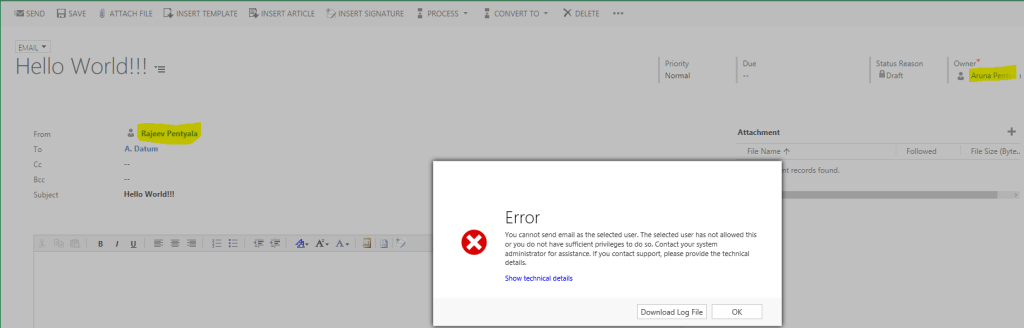 Continue reading →: Dynamics 365 – Error while sending mail on behalf of another user
Recently one of my users complained that they could not send mails on behalf of another users. Issue was because of missing privilege and a setting at actual user, whom the other user trying to send on behalf of Reason and fix: To explain this better, I have 2 Users…
-
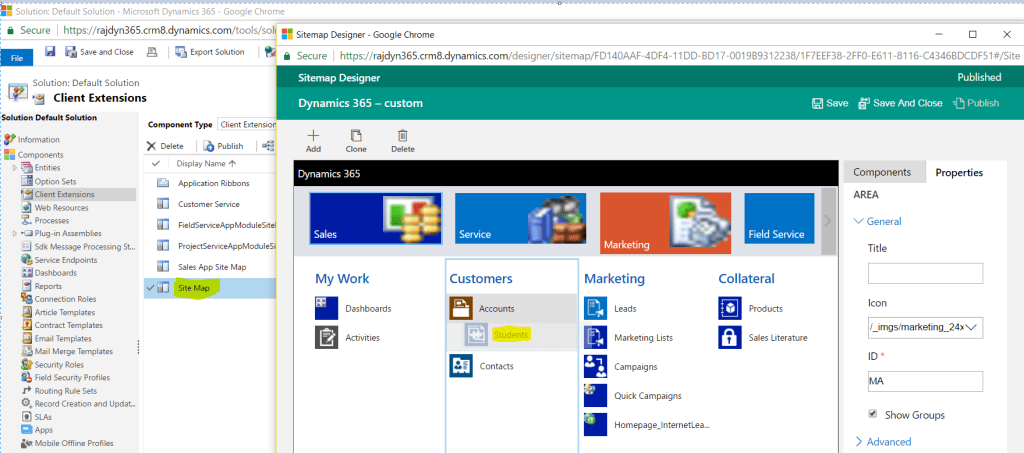 Continue reading →: Dynamics 365 – Native Sitemap Editor
Before Dynamics 365, to edit the Sitemap we had to rely on 3rd party solution like ‘XRM Tool Box’ Site Map Editor, Visual Sitemap Editor. With advent of Dynamics 365, a native ‘Sitemap Designer’ has been shipped with product and its very simple to use. To edit the sitemap Open…
-
Continue reading →: ADX Web Site Compilation Error – The type ‘System.Object’ is defined in an assembly that is not referenced.
Recently while compiling my ADX web site, I was getting below compilation exception from all my .ascx (Views) files. Compiler Error Message: CS0012: The type ‘System.Object’ is defined in an assembly that is not referenced. You must add a reference to assembly ‘System.Runtime, Version=4.0.0.0, Culture=neutral, PublicKeyToken=b03f5f7f11d50a3a’ Issue was bit strange…
-
Continue reading →: Wait Condition with ‘Parallel Wait Branch’
In my previous article , I explained using ‘Wait Condition’ with simple scenario. In this article, lets see using ‘Parallel Wait Branch’ with Wait Conditions. Lets take a simple scenario Up on Opportunity creation, if an Account associated with Opportunity ‘Send Mail’ to Opportunity owner OR close the Opportunity as…
-
Continue reading →: ‘Wait Condition’ in Workflow Explained
I was asked by one of my blog followers to explain ‘Wait Condition’ in Workflow. To explain this better, I took a small scenario Send an Email to Opportunity Owner, whenever an Account has been assigned to the Opportunity Configuring Work Flow : Create a workflow on Opportunity which triggers…
-
Continue reading →: Solution Import Failures / Publish Customizations Failures – Dynamics 365
Recently we upgraded our organizations to Dynamics 365 and we were getting solution import failure while moving solutions between organizations. Below are different kind of error messages popped up. Getting Dependency Calculation There was an error calculating dependencies for this component. Missing component id {0} Failure trying to associate it…
-
Continue reading →: CRM Record “Email a Link” feature not working
Recently few of our CRM users complained OOB “Email a Link” not working. Reason: Machines default “Email” App was set to “Chrome” Fix: Change default “Email” App to “Mail” or “Outlook” client 🙂
Visitors
2,152,453 hits



 Rajeev Pentyala – Technical Blog on Power Platform, Azure and AI