The GitHub Copilot SDK is the agent that powers GitHub Copilot CLI, published as a library. Instead of chatting with Copilot, your application calls it from code.
In this post, lets use the SDK from a C# console app to repair a project that will not compile.
What is the GitHub Copilot SDK?
Copilot is usually something you talk to in an editor or a terminal. The SDK is the same agent, available as a library you call from code.
- It exposes the engine that runs the Copilot CLI. You call it from your own application.
- Copilot does the planning, picks the tools and edits the files. You do not write that loop.
- It runs wherever your code runs. Desktop tools, console apps, background jobs and web backends all work.
- The reply comes back as data. Your program can branch on it, log it, or fail a build with it.
Here is what the demo covers.
What This Does
- A small project named
BrokenApphas a compile error placed in it on purpose. - A second console app named
CopilotRunneruses the Copilot SDK to repair it. - The runner sends one plain English instruction. No file name and no line number.
- Copilot reads the file, edits it and rebuilds the project.
- The runner then checks the result itself and prints PASS or FAIL.
Prerequisites
Make sure you have the following ready.
- The .NET SDK. The sample here targets
net10.0. - The GitHub Copilot CLI. On Windows, install it with
winget install GitHub.Copilot. - Sign in once with
copilot login. The SDK reuses that sign in, so your code needs no API key. - A GitHub Copilot subscription. The free tier works, with limited usage.
Note: The SDK does not call an API directly. It talks to the Copilot CLI, so the CLI has to be installed. The CLI has no window of its own, so this also runs on a server or inside a container.
Lets start with the project that fails to build.
The Broken Project
BrokenAppadds five numbers and prints the average. One line is wrong.- Run
dotnet buildin that folder and it fails.

- The error reads
CS0019: Operator '/' cannot be applied to operands of type 'int' and 'method group'.
Now lets build another console app which used ‘Copilot SDK’ and repairs the BrokenApp.
Copilot Runner App
- Create a new C# consoled App.
- Add the SDK package to the runner project.
dotnet add package GitHub.Copilot.SDK
- In the Program.cs, create a Client and a Session.

Three settings carry the work.
| Setting | What it does |
|---|---|
Connection | Points at the copilot.exe installed on this machine |
WorkingDirectory | Limits the agent to the BrokenApp folder |
OnPermissionRequest | Decides whether each action is allowed |
Notice there is no API key and no password in the code. The CLI already holds your sign in, and the SDK borrows it.
Important:
PermissionHandler.ApproveAllapproves every action without asking. Use it on a throwaway folder only.
- A Session is one conversation. Setting
Modeltoautolets Copilot pick a suitable model for you.
Send One Instruction
- The whole task goes in a single prompt.

- The prompt describes the goal. Copilot works out the steps. It also caps the work at three build attempts, so the run cannot continue forever.
Run It
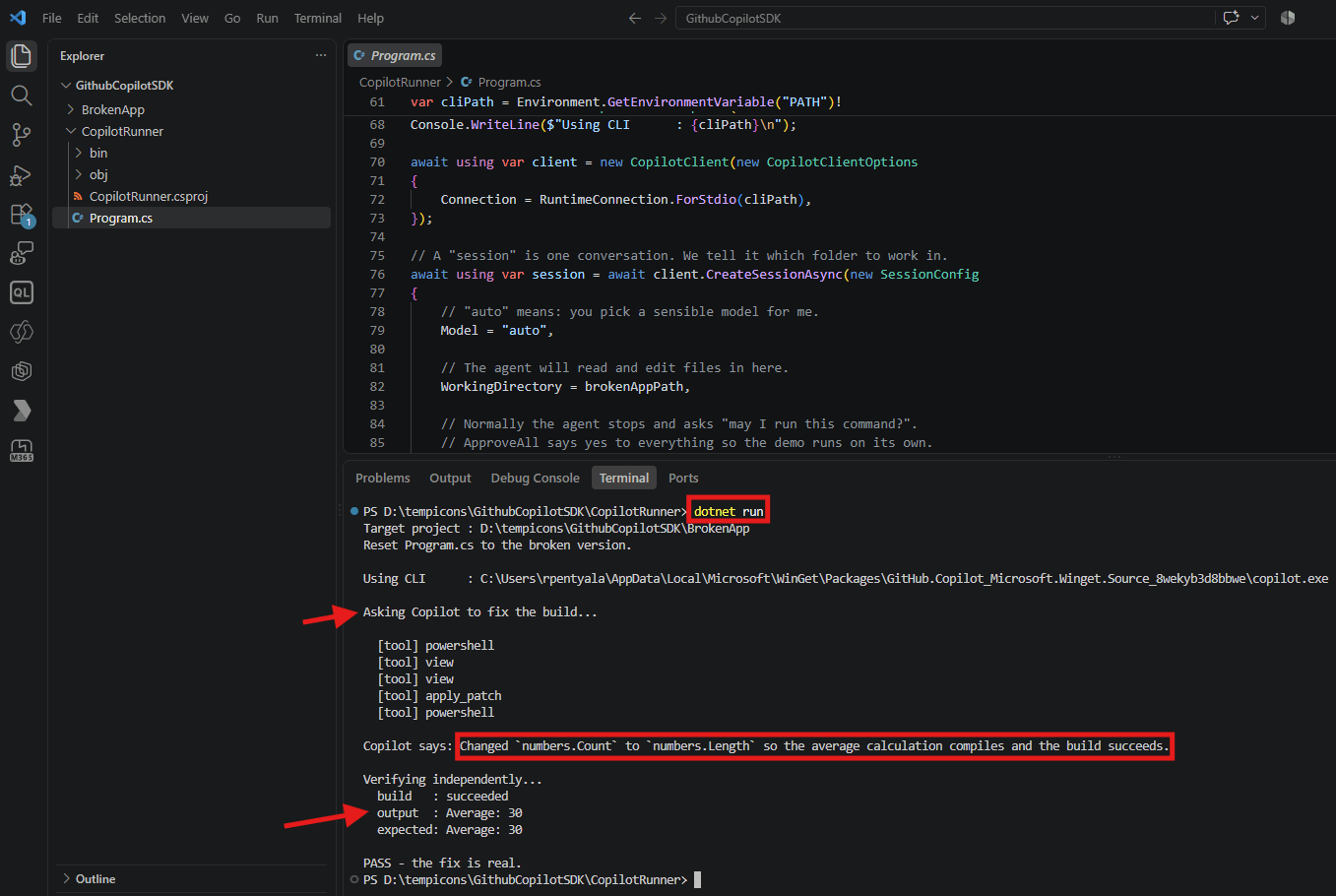
- Run the runner project with
dotnet run.
- The
[tool]lines show what Copilot chose to do, one step at a time.powershellran the build and saw it fail.viewopened the file and read it.apply_patchedited the wrong line.powershellran the build again to confirm.
Check the Result
Now that we ran the CopilotRunner app, the issue in BrokenApp should have fixed.
- Open the BrokenApp > Program.cs
- The issue got corrected. We can build the app with no errors.

If the Build Cannot Download the CLI
On a corporate network the build may fail with this error.
error MSB3923: Failed to download file"https://registry.npmjs.org/@github/copilot-win32-x64/..."The SSL connection could not be established.
- The package tries to fetch its own copy of the CLI while building, and the network blocks npm. Two settings avoid the download.
- In the
.csproj, skip the download.
<CopilotSkipCliDownload>true</CopilotSkipCliDownload>
- In code, point at the CLI you already installed.
Connection = RuntimeConnection.ForStdio(cliPath),
Note: If npm is reachable, you do not need either setting.
new CopilotClient()on its own uses the copy that ships with the package.
Summary
We took a project that would not compile, and repaired it from C# code using one instruction.
- Install the Copilot CLI and run
copilot loginonce. The SDK reuses that sign in. - Create a client, then a session, and set
WorkingDirectoryto limit where the agent can work. - Describe the goal in the prompt. Leave out the file names and the steps.
- Verify the result in your own code, so the outcome is a value your program can use.
The full sample is on GitHub at RajeevPentyala/CopilotSDKDemo.
Official documentation: GitHub Copilot SDK and the .NET getting started guide
🙂


Leave a Reply