GitHub stacked pull requests let us split that work into small, dependent pull requests. Each pull request stays focused, while GitHub shows how the complete change fits together.
What Problem Do Stacked Pull Requests Solve?
Assume we are writing an article named Running Coaching Tips. The complete article has three sections:
- Running fundamentals
- A weekly training plan
- Recovery and race-day tips
We could place all three sections in one pull request. That works, but the pull request becomes larger as more sections are added.
Splitting the work into smaller pull requests makes each review easier. The challenge is that the later sections depend on the earlier sections.
A stack records that dependency:
PR 3: Recovery and race-day tips depends onPR 2: Weekly training plan depends onPR 1: Running fundamentals depends onmain
Each pull request can be reviewed separately. When all three are ready, we can merge the complete stack together.
Why Not Create Three Separate Branches?
A stack still uses three separate branches. The difference is where each branch starts.
With independent branches, all three branches start from main. That works well when the changes are unrelated.
With a stack, each branch starts from the branch below it:
main └── running/fundamentals └── running/weekly-plan └── running/recovery-race-day
This structure is useful when later work needs changes from an earlier pull request.
How Was This Managed Before Stacks?
Developers could create the same branch chain manually. They also had to manage the relationships themselves.
- Select the correct base branch for every pull request.
- Merge the pull requests in the correct order.
- Update the remaining branches after a lower pull request was merged.
- Resolve conflicts when branch histories changed.
- Explain the dependency order to reviewers.
GitHub stacks keep these pull requests connected and display their order in the portal.
I am using a Windows machine for this example. Open Command Prompt to run the Git commands.
Note: The same commands can also be run from PowerShell or Windows Terminal.
Prerequisites
We need:
- Git 2.20 or later
- GitHub CLI 2.90.0 or later
- A GitHub repository where we can push branches
- GitHub CLI authentication
Check the installed versions:
git --versiongh --version
On Windows, update GitHub CLI when required:
winget upgrade --id GitHub.cli -e
Authenticate with GitHub:
gh auth login
Install the official stacked pull requests extension:
gh extension install github/gh-stack
Now that the prerequisites are met, lets proceed with creating the stack.
Create the Stacked Pull Requests
I already created the GitHubStackedPRDemo repository in GitHub for this example. The same repository is shared so you can review the completed files and pull requests.
- Clone the GitHub repository you created and open its folder. For this example, I am cloning the
GitHubStackedPRDemorepository:
git clone https://github.com/RajeevPentyala/GitHubStackedPRDemo.gitcd GitHubStackedPRDemo
Add the Running Fundamentals Layer
- Initialize the stack with the first branch:
gh stack init running/fundamentals
- Create
running-coaching-tips.mdfile and add the running fundamentals section. Commit the file:
git add running-coaching-tips.mdgit commit -m "Add running fundamentals"
- Submit the current stack:
gh stack submit --auto
- The
--autooption skips the interactive editor. New pull requests are created as drafts unless we also pass--open. - Open GitHub portal and you will see a PR. The first pull request targets
main. At this stage, the stack has only one layer.
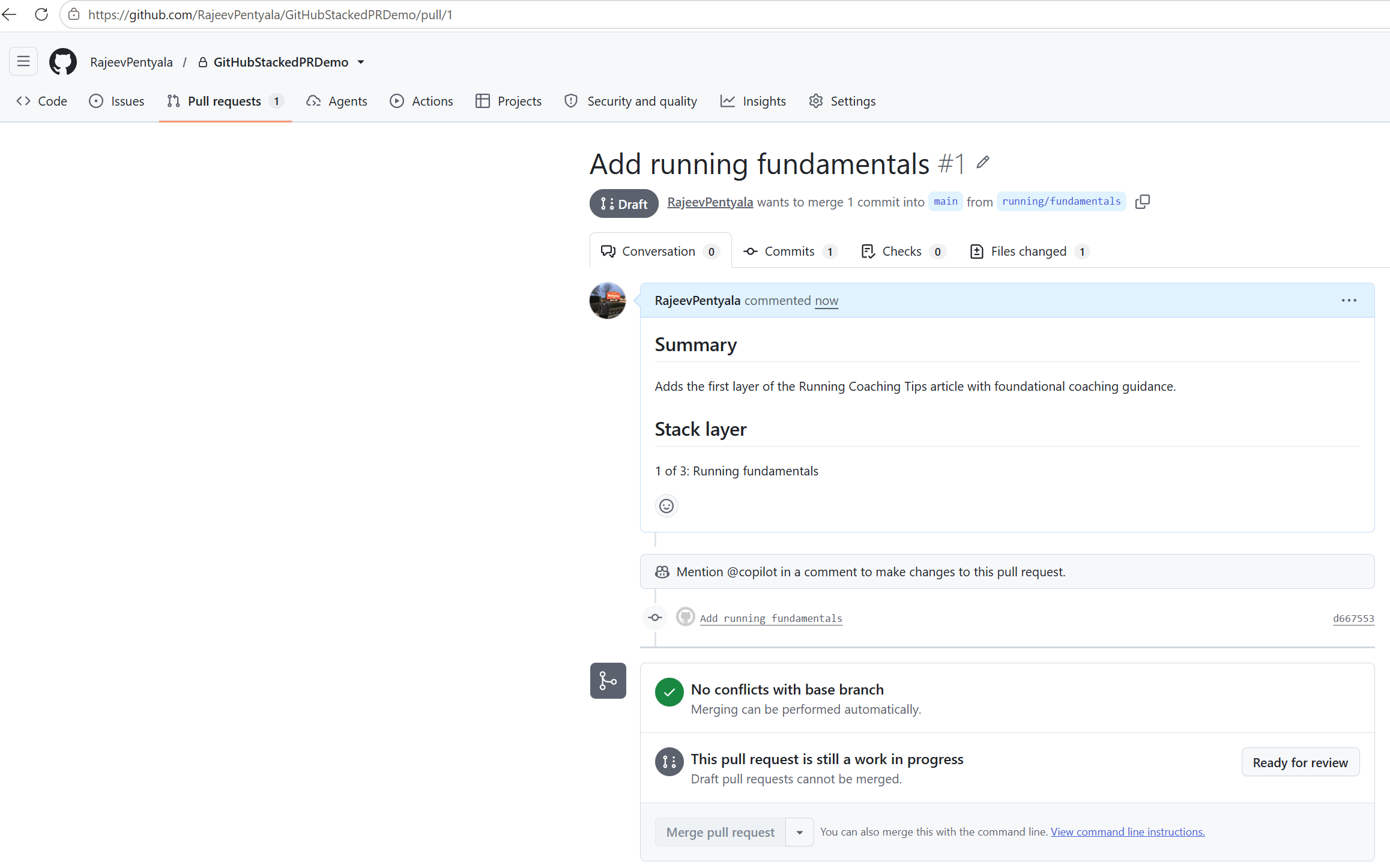
Now we have the fundamentals layer submitted. Lets add the weekly training plan on top of it.
Add the Weekly Training Plan Layer
- Create the second branch on top of the current stack:
gh stack add running/weekly-plan
- Add the weekly plan section to the same Markdown file. Commit and submit the stack again:
git add running-coaching-tips.mdgit commit -m "Add weekly training plan"gh stack submit --auto
- GitHub creates the second pull request and connects both pull requests.
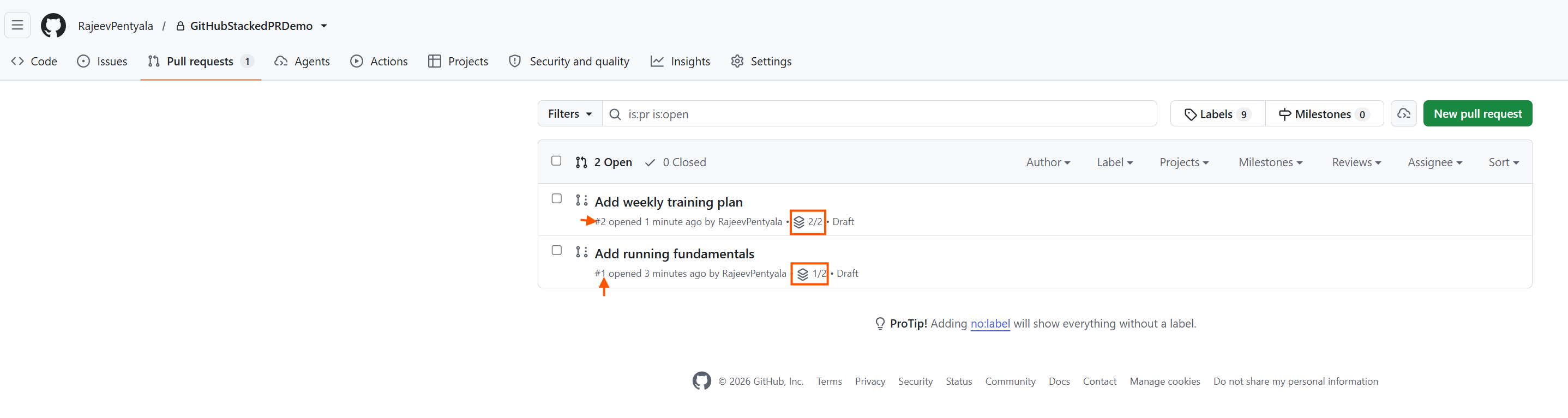
- The stack indicators show
1/2and2/2. Open either pull request to view the stack map.
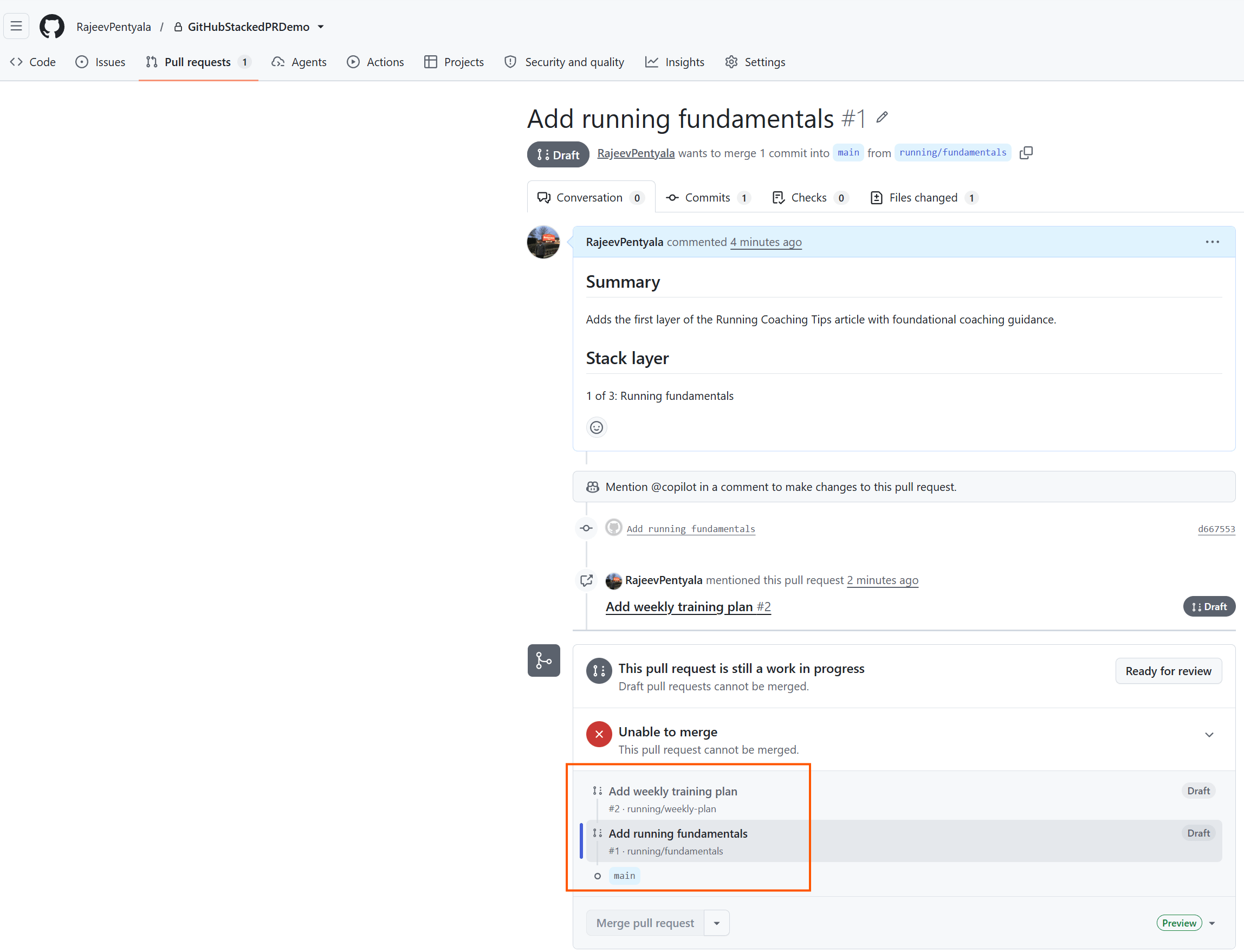
- The map shows the weekly plan above the fundamentals layer. The fundamentals pull request still targets
main. - Now the stack has two connected pull requests. Lets add the final recovery and race-day layer.
Add the Recovery and Race-Day Layer
- Create the third branch:
gh stack add running/recovery-race-day
- Add the recovery and race-day section. Commit and submit the stack:
git add running-coaching-tips.mdgit commit -m "Add recovery and race-day tips"gh stack submit --auto
- GitHub now shows three pull requests in the stack.

Note: The top pull request is PR #4 in this repository. It is still layer three of the stack because pull request numbers can have gaps.
- Review each pull request and use Files changed to inspect its focused change.
Now all three layers are ready for review. Lets proceed with merging them as one stack.
Merge the Complete Stack
- The pull requests were created as drafts. Open each pull request and select Ready for review when its change is ready.
- Once every layer is ready, open the top pull request.
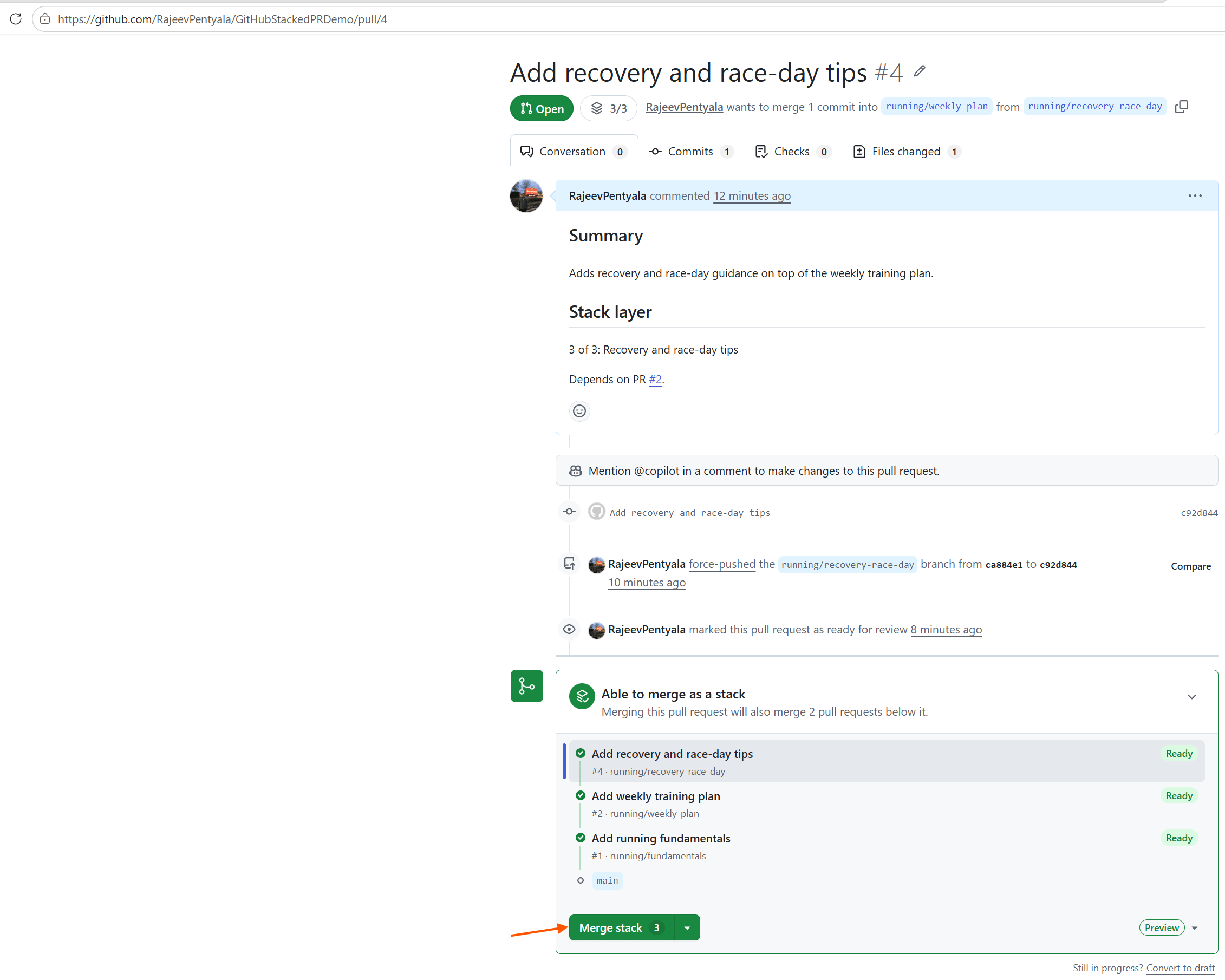
- Select Merge stack. GitHub confirms that all three pull requests will be included.

- Select Merge stack 3. GitHub confirms that all three pull requests will be included.
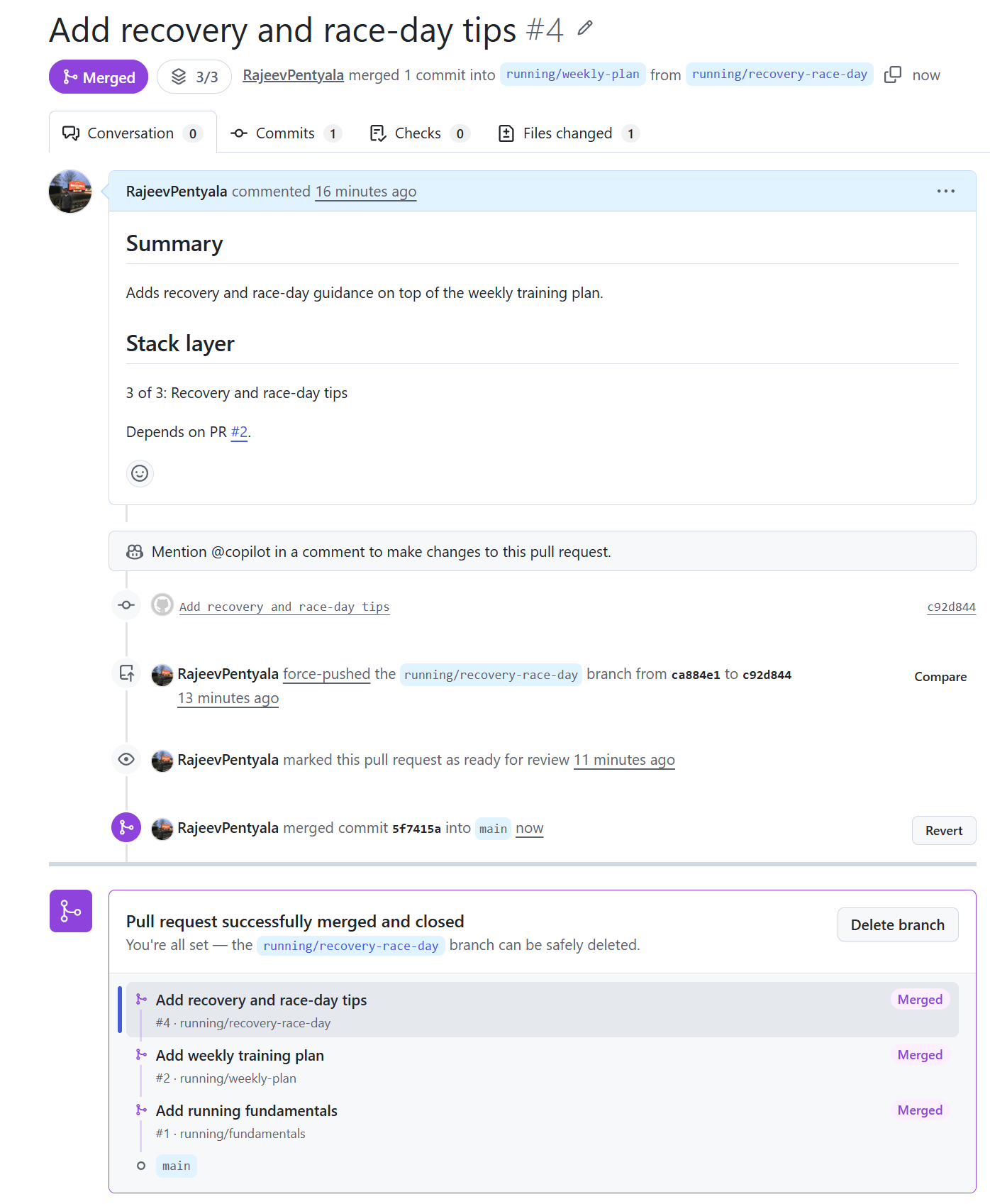
Now the complete change is available in main. Lets recap what the stack provided.
Summary
Stacked pull requests solve a review problem. They split one large change into smaller pull requests while preserving the dependency between them.
The branches are still normal Git branches. GitHub connects them as a stack, displays their order, and provides one action to merge the complete change.
The demo repository is available at GitHubStackedPRDemo.
Official documentation: Quickstart for stacked pull requests
Announcement: Stacked pull requests are now in public preview
Lets use stacks when a large change contains small parts that depend on each other. 🙂


Leave a Reply