-
Continue reading →: D365 July Updates – Multi select option set and Virtual entity
With July updates Dynamics 365 introduced few new features. I am going to touch base: Virtual Entity: Virtual entities replace previous client-side and server-side approaches to integrating external data, which required customized code and suffered from numerous limitations, including imperfect integration, data duplication, or extensive commitment of development resources. Virtual…
-
Continue reading →: Azure Web Deploy – Time out errors
Recently when we were trying to publish a web site to Azure ‘Deployment Slot’ using Visual Studio “Web Deploy” option, we encountered either Time out exception or VS hung after few files push. Reason for this exception could be due to the enormous transactions on main (Prod) web app of…
-
Continue reading →: Dynamics 365 Portal – Troubleshoot errors hosted in Azure
Recently we got internal server error while we were accessing Portal hosted in Azure. Microsoft Azure is providing simple and quick way to troubleshoot the errors. There are few options to troubleshoot like ‘Log Stream’ and ‘Diagnostic Dumps’. In this Article, I am going to show how to use them.…
-
Continue reading →: ADX Portals Web Notification system job failures and fix
Other day ADX web notification system jobs were failing/in Progress from long with below error message To give little background on Web Notifications: Adxstudio Portal application caches results from CRM to improve performance. This is done by adding a Web Notification URL in CRM (Advanced Find –> Web Notification URLS)…
-
Continue reading →: ADX Portal – Configure views to fetch Logged In Partner owned records
As we know, ADX portal would be accessed by external Partners and they get created as Contacts in the CRM. We got a requirement to configure “My Opportunities” view in Portal to show the Opportunities owned by logged in Partner. In CRM, this type of requirement is straight forward as…
-
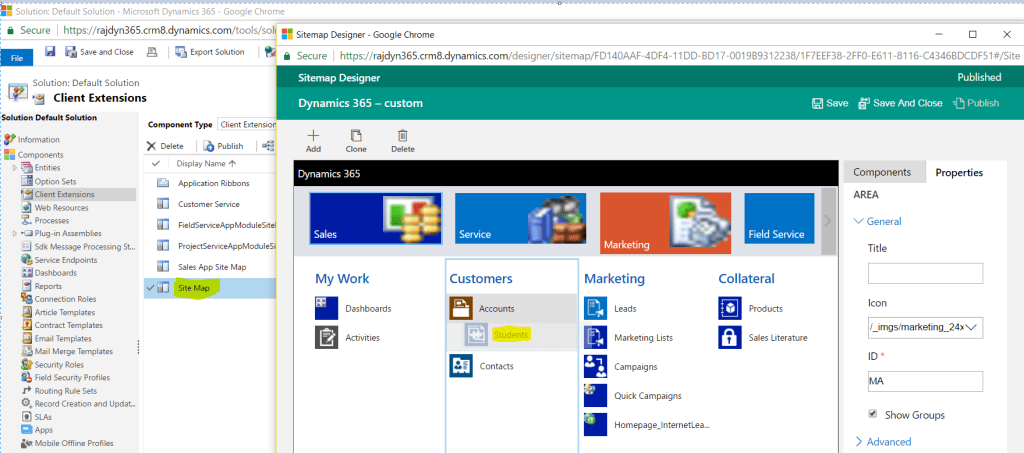 Continue reading →: Dynamics 365 – Native Sitemap Editor
Before Dynamics 365, to edit the Sitemap we had to rely on 3rd party solution like ‘XRM Tool Box’ Site Map Editor, Visual Sitemap Editor. With advent of Dynamics 365, a native ‘Sitemap Designer’ has been shipped with product and its very simple to use. To edit the sitemap Open…
-
Continue reading →: Wait Condition with ‘Parallel Wait Branch’
In my previous article , I explained using ‘Wait Condition’ with simple scenario. In this article, lets see using ‘Parallel Wait Branch’ with Wait Conditions. Lets take a simple scenario Up on Opportunity creation, if an Account associated with Opportunity ‘Send Mail’ to Opportunity owner OR close the Opportunity as…
-
Continue reading →: ‘Wait Condition’ in Workflow Explained
I was asked by one of my blog followers to explain ‘Wait Condition’ in Workflow. To explain this better, I took a small scenario Send an Email to Opportunity Owner, whenever an Account has been assigned to the Opportunity Configuring Work Flow : Create a workflow on Opportunity which triggers…
-
Continue reading →: Access and Edit Web App files hosted in Azure
I have an Asp.Net Web application hosted as a Web App in my Azure instance. One of the requirement I frequently get is to view or edit the published ‘Web App’ files from Azure Portal. As we cannot access the ‘Web App’ files from Azure portal, one of the simpler…
Visitors
2,152,424 hits



 Rajeev Pentyala – Technical Blog on Power Platform, Azure and AI