Microsoft has announced natural language app building in Copilot Cowork and Copilot Studio. We can now describe a business app and let Copilot turn that description into a working application.
Lets understand the new app building flow.
Build an app from Copilot Cowork
- Copilot Cowork provides a chat-first app building experience.
- The built-in
/appskill lets you create lightweight, interactive apps in Cowork without writing code. - Start a Cowork chat and use the
/appskill to describe the application. - You can reference data from Microsoft 365 sources, such as documents, spreadsheets, meetings, and messages.
- You can continue the conversation to change the layout, features, and behavior. The app preview appears beside the Cowork conversation.
- The following screenshot shows a Procurement Review Hub created from Copilot Cowork. The conversation remains available while the app runs in the preview.

The /app skill is available through the Microsoft Frontier program. Frontier provides early access to Microsoft 365 Copilot features.
Build an app from Copilot Studio
- Open Copilot Studio and select App (Preview) from the home page. Describe the app, its users, required data, and actions.
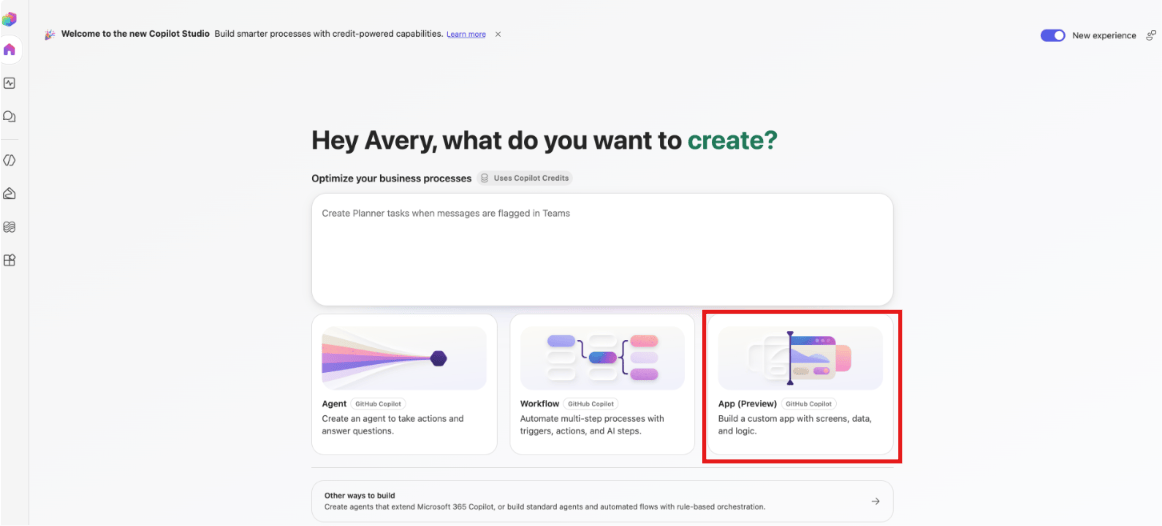
- Copilot Studio creates the application from that description. We can preview the app and continue updating it through natural language.
- This lets teams combine an interactive app, conversational assistance, and process automation for one business process.
- For example, an employee onboarding solution could combine:
- An app that shows tasks, due dates, and progress.
- An agent that answers questions using company information.
- A workflow that updates the onboarding system.
Connect apps to business data
- The apps can use connectors to work with business data. They can also use Work IQ to access organizational context.
- Apps can read information and write results back to connected systems. This means an app can do more than display information.
Note: Microsoft Entra identity, organizational data policies, and connector policies are respected by default.
🙂

![[Step by Step] Using Custom Connectors in Copilot Studio](https://rajeevpentyala.com/wp-content/uploads/2024/10/record-ezgif.com-video-to-gif-converter-7.gif)
Leave a Reply