
Most of you know that an Access team owns no records and has no security roles assigned to it.
Records will be shared with an Access team, and the team is granted access rights on records such as Read, Write and Append.
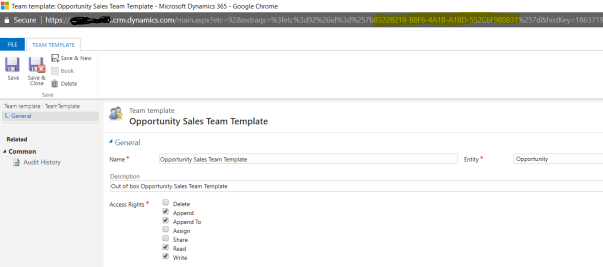
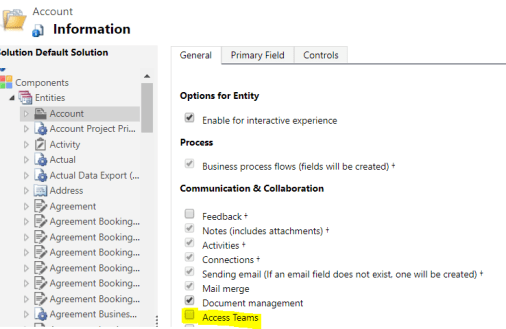
By default, we would get one OOB Opportunity Access Team and we can enable “Access Team” for required entities by selecting “Access Teams” option in entity customization’s.
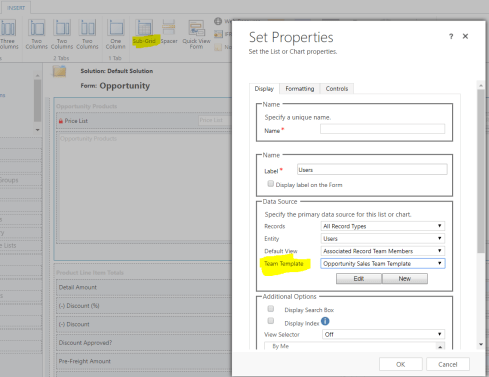
We can add “Access Team” to the form’s sub grid and keep adding the users
Below is the sample code to retrieve the members of Access Team for a record (i.e., Opportunity in this case)
Code Snippet:
Private void GetUsersFromOpportunitySalesTeam(IOrganizationService service, Guid opportunityId, Guid teamTemplateId) {
var fetchUsersFromSalesTeam = @”<fetch>
<entity name=’opportunity’ > <attribute name=’name’ />
<filter type=’and’>
<condition attribute=’opportunityid’ operator=’eq’ value=’” + opportunityId + @”‘ /> </filter>
<link-entity name=’principalobjectaccess’ from=’objectid’ to=’opportunityid’ link-type=’inner’ alias=’poa’ >
<attribute name=’objectid’ alias=’objectid’ />
<link-entity name=’team’ from=’teamid’ to=’principalid’ link-type=’inner’ >
<link-entity name=’teamtemplate’ from=’teamtemplateid’ to=’teamtemplateid’ >
<filter type=’and’>
<condition attribute=’teamtemplateid’ operator=’eq’ value=’” + teamTemplateId + @”‘/> </filter>
</link-entity>
<link-entity name=’teammembership’ from=’teamid’ to=’teamid’ link-type=’inner’ intersect=’true’ >
<link-entity name=’systemuser’ from=’systemuserid’ to=’systemuserid’ link-type=’inner’ >
<attribute name=’fullname’ /> <attribute name=’systemuserid’ />
</link-entity> </link-entity> </link-entity> </link-entity> </entity>
</fetch>”;
var teamMembers = service.RetrieveMultiple(new FetchExpression(fetchUsersFromSalesTeam));
// Retrieve User Guids
if (teamMembers!= null && teamMembers.Entities.Count > 0) {
foreach (var teamMember in teamMembers.Entities){
if (teamMember.Attributes.Contains(“systemuser5.systemuserid”) && teamMember.Attributes[“systemuser5.systemuserid”] != null) {
Guid userId = new Guid(((AliasedValue) teamMember.Attributes[“systemuser5.systemuserid”]).Value.ToString());
}
}
}
How to get the “Access Team Id” (i.e.,teamTemplateId)
- Make a retrieve call “teamtemplate” entity and retrieve the Id by Name field (i.e., Opportunity Sales Team Template)
- Or you can get the GUID from URL of “Access Team Template”
Points to ponder:
- “Access Team” is not a solution aware component and cannot be added to the Solution to move across the organizations.
- If you have an Opportunity Access Team sub grid on Account form and if you move the customization’s from Dev to Test organizations, the sub grids will break, if you cannot maintain the “Access Team” with same Id
- To move Access Teams between Organizations with same Guid’s, below are couple of ways
🙂



 Rajeev Pentyala – Technical Blog on Power Platform, Azure and AI
Leave a reply to Rawish Kumar Cancel reply