Below are few useful points about “Address“ in CRM
In CRM, “Account” and “Contact” entities have built-in fields to capture two sets of addresses.
These fields are address1_street1, address1_city, address1_stateorprovince, etc., as well as another whole set for address2 fields.
We normally assume that 2 default set of address fields have been added on the account/contact entity.
But this not really the case. All addresses are only stored in the “Customer Address” entity.
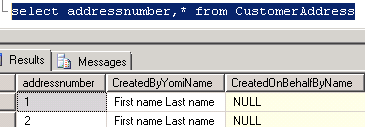
When you create a new account/contact, it would by default in the background add 2 records in the “Customer Address” entity for the 2 set of address fields available on the Account form.
CRM distinguishes these entries from the rest of the entries to be displayed in More addresses using the Address number column.
Address number 1 and 2 are reserved for the 2 set of address fields available on the account form.
Customer Address
Along with these 2 sets, we also have “More Addresses” link on the both Account\Contact navigation area
The first two Address records that the platform creates are hidden in the “More Addresses” associated view on the Account or Contact
Addresses are not available on Security Roles
You cannot update the Address record via workflow
Security Over Address :-
The security access to the Address entity is tied directly with that of “Account”entity.
e.g. For the Contact entity, the user will only be able to see the “More Addresses” in the left nav only if the user has “Read” access to the Account entity.
If you want to allow the user to “Add New Address” on the Contact form,
Grant “Create” and “Append” access for Account entity and “Append To” access on the Contact entity.
Granting “Write” access to Account entity will allow the user to edit the Addresses.



 Rajeev Pentyala – Technical Blog on Power Platform, Azure and AI
Leave a reply to Did You Know, Dynamics CRM & xRM #16 « North52 Cancel reply