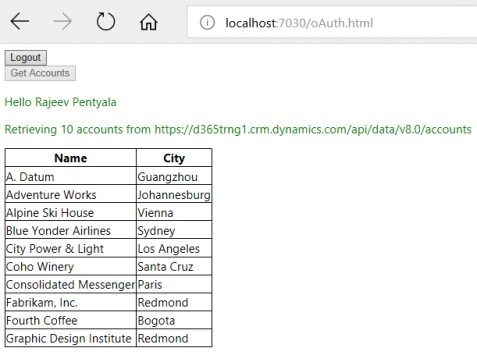
I was building a standalone HTML page which retrieves the Account records from Dynamics 365 and show them in a table.
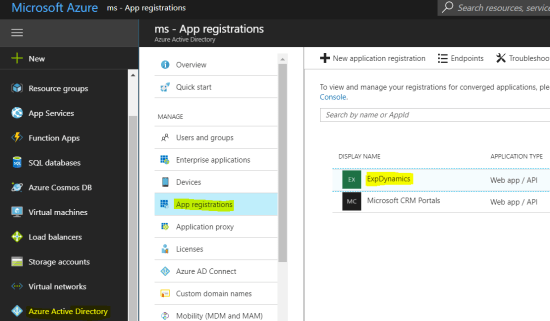
As a prerequisite, I registered the application in Azure Active Directory’s ‘App registrations’.
Also configured the Application details in my HTML page
var organizationURI = “https://{orgname}.crm.dynamics.com”; //The URL to connect to CRM (online)
var tenant = “{Azure Tenant Name}.onmicrosoft.com”; //The name of the Azure AD organization you use
var clientId = “{Application ID}”; //The ApplicationId you got when you registered the application
var pageUrl = “http://localhost”; //The URL of your HTML page in your development environment.
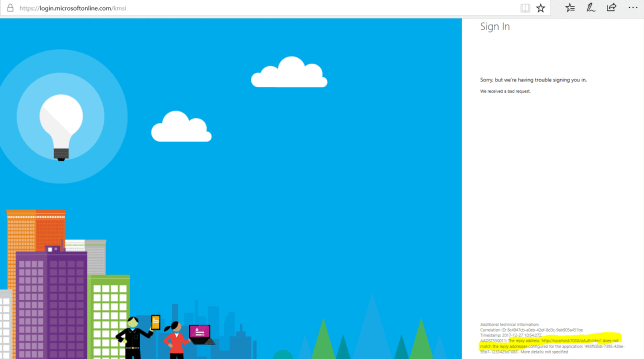
After all the configuration, I was getting below error during the authentication
The reply address “http://…..” does not match the reply address configured for the application.
Reason and Fix:
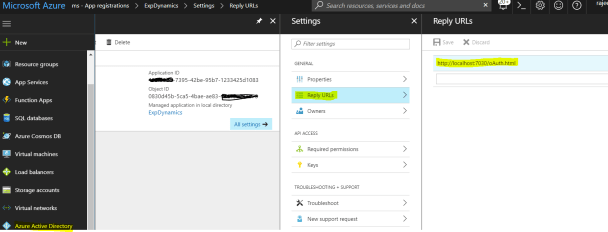
- There must be a ‘Return URL’ configured with your application URL (i.e., HTML url in my case).
- To configure the ‘Return URL’
- Connect to ‘Azure Active Directory’ –> App registrations
- Select your configured Application
- Under ‘Settings’, click on ‘Reply URLs’
- Add your application URL (i.e., HTML url in my case)
- Rerun the Application and you should be able to connect and get Accounts
Refer this MSDN article for step by step to connect via ADAL
🙂


 Rajeev Pentyala – Technical Blog on Power Platform, Azure and AI
Leave a comment