With CRM 2015, you can represent self-referenced records in Chart format, this feature called as ‘Hierarchy Visualization’.
If the Entity is configured for ‘Hierarchy Visualization’, a symbol as below will appear for Self referenced records.
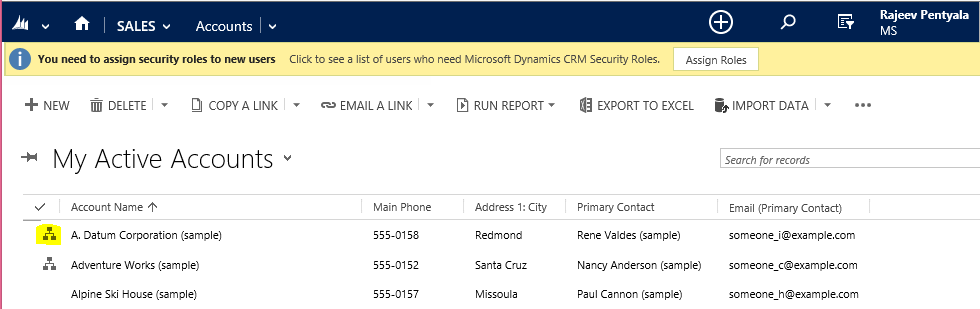
By clicking the chart symbol you will be redirected to below Chart.

Every rectangle, contain record information called as a ‘Tile’
Here is the video from Dynamics team on how to configure ‘Hierarchical Visualization’.
Quick Points
- Only below listed Out Of The box entities can be configured as ‘Hierarchical Visualization’.
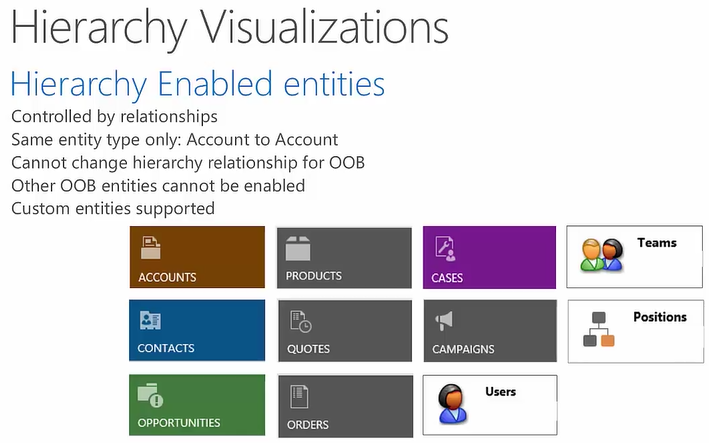
- Business Units are not supported.
- Only 1:N relationships can be enabled to be hierarchical (Not supported for N:N)
- Hierarchical settings can be included in Solutions.
- Record data displayed in tile is from ‘Quick View Form’. Only 4 fields are displayed on a tile excluding Sub-grids & IFrames.
- Querying Hierarchical Data
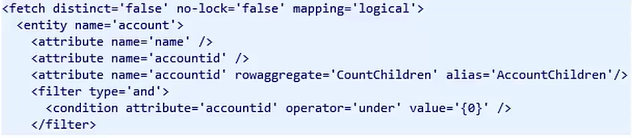
- New commands added in ‘FetchXML’ and ‘Condition Expression’ of ‘Query Expression’, to query Hierarchical data.
- Querying Hierarchical data not supported with OData end point.

- A new RowAggregate called ‘CountChildren’ has been added which returns Count of Child records for the Current record.
🙂


![[Step by Step] Beginner : Create a PCF control and add it to a custom page](https://rajeevpentyala.com/wp-content/uploads/2024/12/image-49.png)
 Rajeev Pentyala – Technical Blog on Power Platform, Azure and AI
Leave a comment