In UR 12, the lead conversion process has been redesigned. Refer below for lead qualify process before and after UR 12
Lead conversion before UR 12
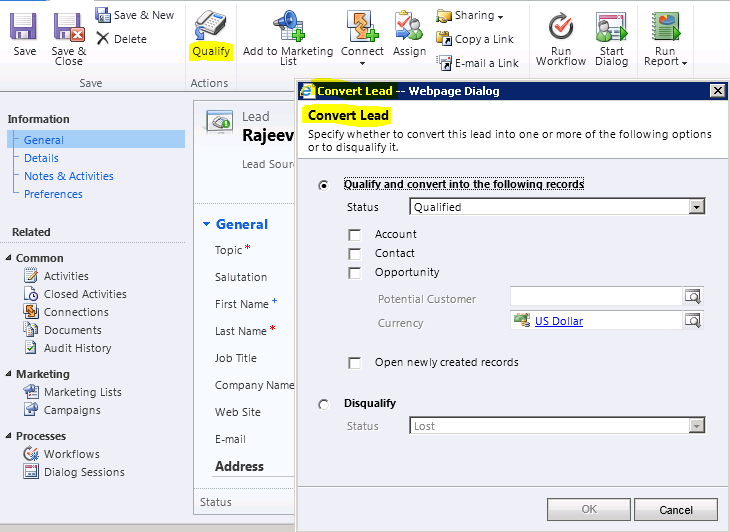
Before UR 12, we have “Qualify” button on Lead ribbon
It opens a “Convert Lead” web page, which gives us options to create Contact/Account/Opportunity.
Convert Lead – Before UR 12
After UR 12
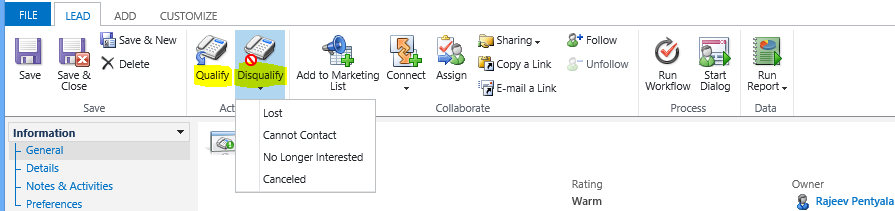
With new design, the “Convert Lead” dialog box no longer appears during lead qualification.
We have 2 ribbon buttons (Qualify and Disqualify).
Convert Lead – UR 12
The qualify button will automatically create the related Opportunity record based on the customer information entered into the Lead form
Associated Contact and Account records will also be automatically created based on the First Name, Last Name, and Company Name field data, respectively
If you click disqualify you are able to select the status reason, otherwise if you click qualify the lead will just automatically be qualified.



 Rajeev Pentyala – Technical Blog on Power Platform, Azure and AI
Leave a reply to Jerako Cancel reply