In CRM 2011, when you create a new entity you can define the entities “Ownership” by choosing “Ownership” option
Entity Ownership

So what does it mean? Entities, can be owned by
- Organization
- User or a Team
Lets see the difference between both
Organization owned entity
- Records of “Organization owned entity” can be viewed by the whole organization
- Records cannot be shared or Assigned
Can’t Share/Assign Org owned entity record
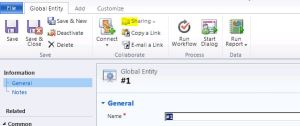
- The security roles for organization-owned entities have two access levels: None and Organization
- i.e., You cannot define “Access levels” like (User level, Business unit level, Parent: Child Business unit level)
User or a Team owned entity
- Records of “User or a Team owned entity” can be limited to users or teams, so that you restrict data access to authorized users
- The user-owned or team-owned entities have five access levels: None, User level, Business unit level, Parent: Child Business unit level, Organization
🙂



![[Step by Step] Beginner : Create a PCF control and add it to a custom page](https://rajeevpentyala.com/wp-content/uploads/2024/12/image-49.png)
 Rajeev Pentyala – Technical Blog on Power Platform, Azure and AI
Leave a reply to V Cancel reply