In this article, I will show you how to create a simple HTML web resource that accepts parameters and host it inside a Model-Driven App.
We will use the $webresource directive in the navigation to pass a data parameter to the HTML page.
Why Pass Parameters to Web Resources?
- Sometimes you need your HTML web resource to behave differently based on context.
- For example, you might want to pass a deep-link path, a target role, or configuration values.
- The
$webresourcedirective with the?data=query parameter makes this possible right from the SiteMap navigation.
Create the HTML Web Resource
Let’s start by creating a simple HTML file that reads the data parameter from the URL.
- Here’s the complete HTML file I used for this demo:
<html lang="en-us"><head> <meta charset="UTF-8"> <meta name="viewport" content="width=device-width, initial-scale=1.0"> <title>Sample Web Resource - Parameter Demo</title> <style> body { font-family: 'Segoe UI', Tahoma, Arial, sans-serif; background-color: #f0f4f8; margin: 0; padding: 30px; color: #333; } .container { max-width: 700px; margin: 0 auto; background: #fff; border-radius: 8px; box-shadow: 0 2px 12px rgba(0, 0, 0, 0.08); padding: 30px; } h1 { font-size: 22px; margin-top: 0; color: #0078d4; } .param-section { margin-top: 20px; padding: 16px; background-color: #f9fbfd; border-left: 4px solid #0078d4; border-radius: 4px; } .param-label { font-weight: 600; color: #555; font-size: 13px; text-transform: uppercase; } .param-value { font-size: 18px; margin-top: 6px; color: #111; } table { width: 100%; border-collapse: collapse; margin-top: 20px; } th, td { padding: 10px 14px; text-align: left; border: 1px solid #e0e0e0; } th { background-color: #0078d4; color: #fff; font-weight: 600; } .no-params { color: #888; font-style: italic; margin-top: 20px; } .usage-note { margin-top: 24px; padding: 12px; background: #fff8e1; border-radius: 4px; font-size: 13px; color: #6d5b00; } code { background: #eef2f7; padding: 2px 6px; border-radius: 3px; font-size: 13px; } </style></head><body> <div class="container"> <h1>📦 Web Resource - Parameter Demo</h1> <p>This web resource reads parameters passed via the <code>$webresource</code> directive in the SiteMap navigation.</p> <div id="output"></div> <div class="usage-note"> <strong>Usage:</strong> <code>$webresource:raj_samplehtml?data=helloworldparam</code> </div> </div> <script> document.addEventListener('DOMContentLoaded', function () { var outputEl = document.getElementById('output'); var params = new URLSearchParams(window.location.search); var dataParam = decodeURIComponent(params.get("data") || ""); if (!dataParam && params.toString() === "") { outputEl.innerHTML = '<p class="no-params">No parameters were passed to this page.</p>'; return; } var html = ""; if (dataParam) { html += '<div class="param-section">'; html += '<div class="param-label">Data Parameter</div>'; html += '<div class="param-value">' + escapeHtml(dataParam) + '</div>'; html += '</div>'; } var allParams = []; params.forEach(function (value, key) { allParams.push({ key: key, value: decodeURIComponent(value) }); }); if (allParams.length > 0) { html += '<table>'; html += '<thead><tr><th>Parameter</th><th>Value</th></tr></thead>'; html += '<tbody>'; allParams.forEach(function (p) { html += '<tr><td>' + escapeHtml(p.key) + '</td><td>' + escapeHtml(p.value) + '</td></tr>'; }); html += '</tbody></table>'; } outputEl.innerHTML = html; }); function escapeHtml(text) { var div = document.createElement('div'); div.textContent = text; return div.innerHTML; } </script></body></html>
- The key pattern in the above code is:
var params = new URLSearchParams(window.location.search);var dataParam = decodeURIComponent(params.get("data") || "");
- This uses the standard
URLSearchParamsAPI to extract thedataquery parameter, then decodes it usingdecodeURIComponent.
Now let’s upload this HTML file as a web resource in our Dataverse environment.
Upload the Web Resource to Dataverse
- Navigate to your Power Apps environment and go to Solutions
- Open your solution and click New > More > Web resource
- Upload the HTML file
- Set the Name (e.g.,
raj_demoparametershtml) - Set the Display name (e.g.,
Demo Parameters HTML) - File type will automatically be set to Webpage (HTML)
- Click Save and then Publish
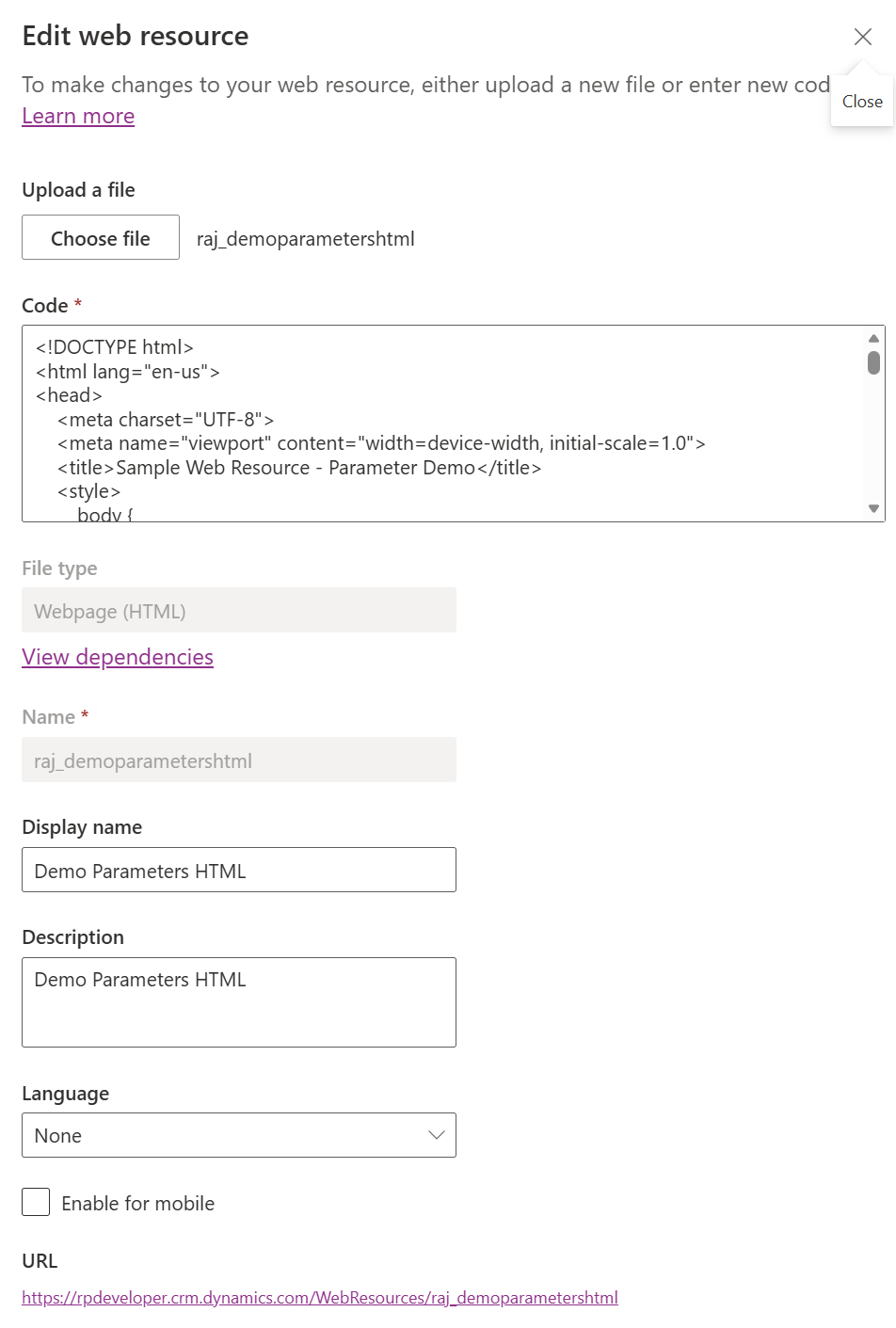
Now that our web resource is created and published, let’s add it to a Model-Driven App.
Add the Web Resource to a Model-Driven App
- Create a new or open your Model-Driven App in the App Designer
- Click + Add page
- Select Web resource from the page type options
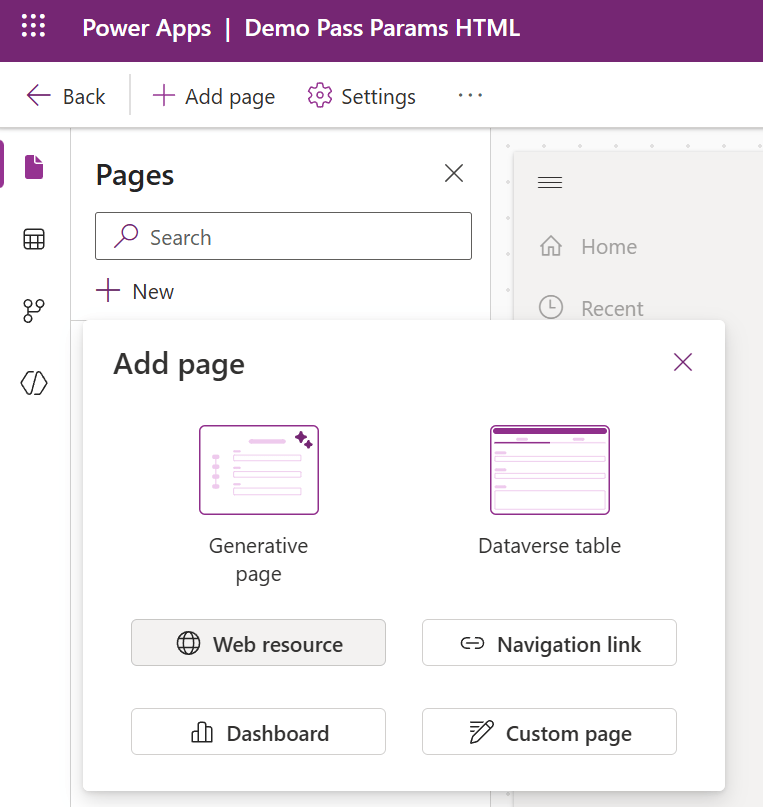
- In the URL dropdown, select your web resource (
Demo Parameters HTML) - Give it a Title (e.g.,
Demo HTML) - Click Add
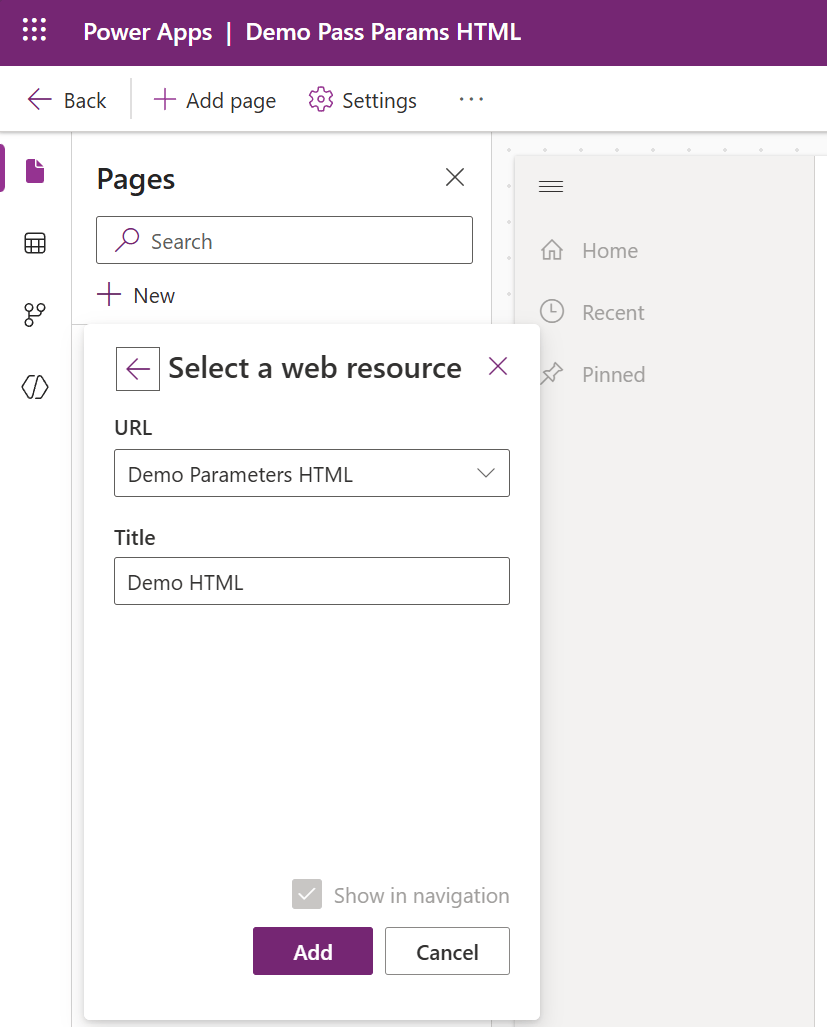
- The web resource page now appears in the navigation panel on the left.

Now comes the important part — let’s configure the URL to pass the data parameter.
Set the $webresource URL with the Data Parameter
This is where we use the $webresource directive to pass parameters.
- Select the web resource page in the navigation (left panel)
- In the Display options panel on the right, change the Content type to URL
- In the URL field, enter the
$webresourcedirective with thedataparameter:- Replace ‘
raj_demoparametershtml‘ with your HTML web resource name.
- Replace ‘
$webresource:raj_demoparametershtml?data=helloworldparam
| Setting | Value |
|---|---|
| Content type | URL |
| URL | $webresource:raj_demoparametershtml?data=helloworldparam |
| Title | Demo HTML |

- Click Save and Publish the app
Let’s play the app and see the result.
Play the App and Verify
- Click Play to launch the Model-Driven App
- Click on Demo HTML in the left navigation
- The HTML web resource loads and displays the parameter value
helloworldparam

Notice in the browser URL bar — you can see the data=helloworldparam being passed as a query parameter to the web resource. The HTML page successfully reads and displays it.
Passing Multiple Parameters
- You can also pass multiple values encoded within the
dataparameter. For example:
$webresource:raj_demoparametershtml?data=first%3DFirst%20Value%26second%3DSecond%20Value
- This encodes
first=First Value&second=Second Valueinside thedataparameter. Your HTML page can then decode and parse these sub-parameters.
- You can also pass additional query parameters alongside
data:
$webresource:raj_demoparametershtml?data=%2Fmy-deeplink&target=admin
🙂
Leave a Reply