In this post, I’ll show you how to stop a running SSIS package in SQL Server.
Let’s say you have deployed SSIS packages to SQL Server and executed one of the packages.

The package will start, and its status will show as Running.

But what if you want to terminate or stop the running package?
Steps to cancel the running SSIS package:
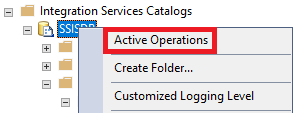
- Right click on Integration Services Catalogs > SSISDB and choose Active Operations
- In the Active Operations pane, select the running package and click on Stop

- This will cancel the package.
🙂


![[Step by Step] Beginner : Create a PCF control and add it to a custom page](https://rajeevpentyala.com/wp-content/uploads/2024/12/image-49.png)
 Rajeev Pentyala – Technical Blog on Power Platform, Azure and AI
Leave a comment