In my previous article : Getting Started with Semantic Kernel and Ollama: Run AI Models Locally in C# I have explained how to run AI models locally by building a simple chat application.
In this article, lets understand what is Function Calling and how we can implement it using simple C# console project with Semantic Kernel
Prerequisites:
- Visual Studio Code or Visual Studio
- A laptop with at least 16 GB of RAM
- Setup Ollama and use Ollama models
Once you complete the setup of Ollama fetch the llama3 model

Why Llama 3.2:1b?
Not all LLMs support function calling!. I initially tried Gemma 3:1b, but it completely lacked function calling capabilities.
After testing, I found out Llama 3.2:1b is the smallest model with reliable function calling support. At just 1.3GB, it’s perfect for local development while maintaining the intelligence needed for proper tool selection.
Now that you have the required prerequisites, lets also understand an important topic : Plugins.
Understanding Plugins:
- At a high-level, a plugin is a group of functions that can be exposed to AI apps and services.
- The functions within plugins can then be orchestrated by an AI application to accomplish user requests.
- Within Semantic Kernel, you can invoke these functions automatically with function calling.
- The easiest way to create a plugin is by defining a class and annotating its methods with the
KernelFunctionattribute. - The Description text is what the AI reads to decide which tool to use when user prompts.
- Example, following is my MathTools plugin which is a C# class with Tools (i.e., C# functions).

Now that you understand the plugins lets proceed with Function Calling implementation.
What is Function Calling:
Function Calling allows you to create a chat bot that can interact with your existing code, making it possible to automate business processes, create code snippets, and more.
What We’re Building:
Our agent will have three distinct tool categories using native code plugins.
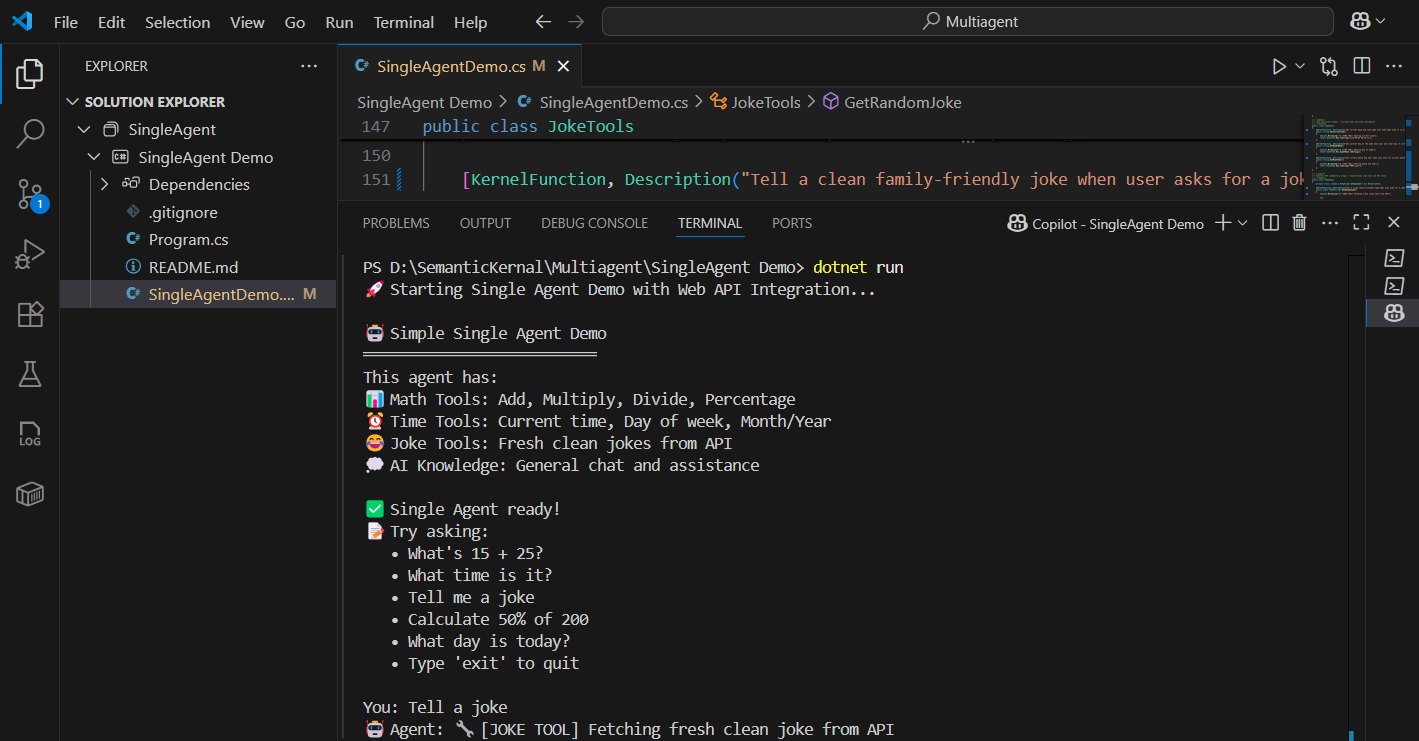
- 📊 Math Tools: Perform calculations (add, multiply, divide, percentages)
- ⏰ Time Tools: Get current time, day of week, and date information
- 😂 Joke Tools: Fetch jokes from external APIs.
Following is how JokeTools C# class looks like. I am calling the jokeapi to fetch a joke.

How functional calling works?:
When a user asks “What’s 15 + 25?”, here’s what happens:
- Intent Recognition: The LLM analyzes the request.
- Tool Selection: Identifies the need for math operations.
- Function Call: Executes `MathTools.Add(15, 25)`
- Response Generation: Returns “The answer is 40”
Getting Started with C# project
The complete implementation is available in my SemanticKernalFunctionCalling with full source code and setup instructions.
You can clone the project and start prompting it by running the project as shown below
Conclusion:
- This implementation showcases function calling architecture using Microsoft Semantic Kernel.
- The codebase demonstrates proper plugin design, external API integration with content filtering, and robust error handling.
- Testing reveals that while the technical implementation is flawless and follows Microsoft best practices, the Llama 3.2:1b model has significant limitations in function calling accuracy and result processing.
- The architecture would perform better with more capable models like GPT-4 or larger Llama variants.
🙂



 Rajeev Pentyala – Technical Blog on Power Platform, Azure and AI
Leave a comment