We have a website, and when one of the users tried to access it, they received the following message: You don’t have access to this

Reason and Fix:
- Its due to the Site visibility in Power Pages. The website was Private.
- All sites that you create in Power Pages are private by default.
- When the site is Private, only users who have the System administrator role in your site’s environment can access.
To grant access to users without the ‘System Administrator’ role, follow these steps:
- Sign in to Power Pages and edit your site.
- In the left side panel, select Security.
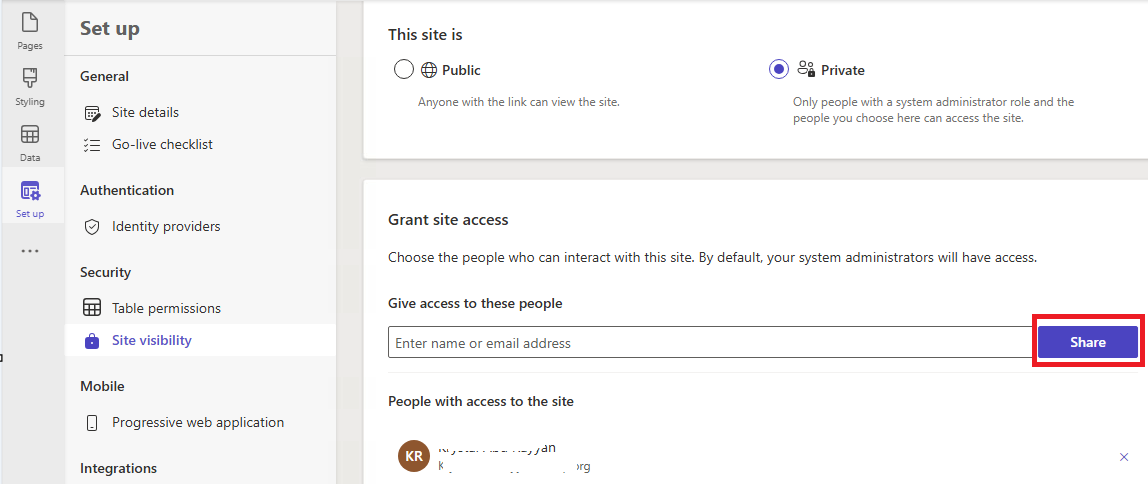
- In the Manage section, select Site visibility.
- In the Grant site access card, enter the names or email addresses of the users you want to grant access to.
- Select Share.
Please refer this documentation for more details : Site visibility in Power Pages
🙂



 Rajeev Pentyala – Technical Blog on Power Platform, Azure and AI
Leave a reply to Axel Cancel reply