There are times when you want to be able to perform data operations without having custom business logic applied.
Let’s say you have a plug-in step registered on the ‘Pre Account Create’ message, which triggers every time before an account is created. In certain data operations, such as data migration or integration, you may want to skip this plug-in logic.
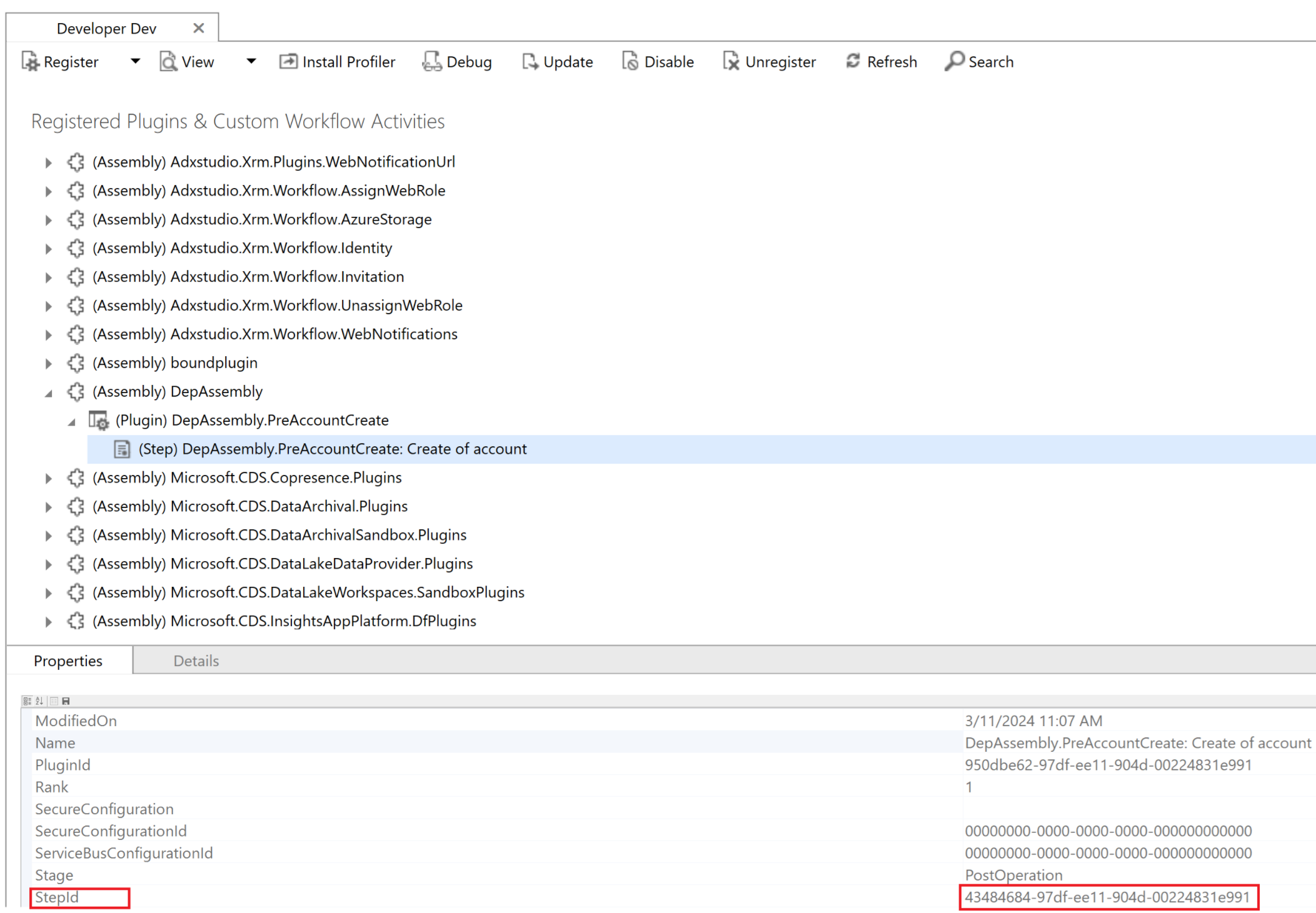
In this article, I will explain how to bypass specified registered plug-in steps’ custom logic by using the BypassBusinessLogicExecutionStepIds parameter.
The following code snippet demonstrates how to skip the PreAccountCreate plug-in step with ID 43484684-97df-ee11-904d-00224831e991 (as shown in the screen above) while creating an Account record using CreateRequest.
static void DemonstrateBypassBusinessLogicExecutionStepIds(IOrganizationService service)
{
   Entity account = new("account");
   account["name"] = "Sample Account";

   CreateRequest request = new()
   {
         Target = account
   };
   request.Parameters.Add("BypassBusinessLogicExecutionStepIds", "43484684-97df-ee11-904d-00224831e991");
   service.Execute(request);
}- Pass the GUID values of the registered plug-in step registrations with BypassBusinessLogicExecutionStepIds parameter.
Similar to BypassBusinessLogicExecutionStepIds parameter, use BypassBusinessLogicExecution to choose whether to bypass synchronous logic, asynchronous logic or, both
The following table describes when to use the parameter values with BypassBusinessLogicExecution.
| Parameter | Description |
|---|---|
CustomSync | Bypass only synchronous custom logic. Use this option to reduce the amount of time required to complete operations in bulk. |
CustomAsync | Bypass only asynchronous custom logic, excluding Power Automate Flows. Use this option to avoid general performance issues that might occur when large numbers of operations trigger asynchronous logic. |
CustomSync,CustomAsync | Bypass both synchronous and asynchronous custom logic, excluding Power Automate Flows. |
Following is the code snippet
static void DemonstrateBypassBusinessLogicExecution(IOrganizationService service)
{
    Entity account = new("account");
    account["name"] = "Sample Account";

    CreateRequest request = new()
    {
        Target = account
    };
    request.Parameters.Add("BypassBusinessLogicExecution", "CustomSync,CustomAsync");
    service.Execute(request);
}
Notes:
- The existing BypassCustomPluginExecution is limited because you can only bypass synchronous business logic. BypassBusinessLogicExecution and BypassBusinessLogicExecutionStepIds options provide more flexibility. The
BypassCustomPluginExecutionoptional parameter will remain supported. - Power Automate flows are not bypassed using these optional parameters. Learn how to bypass Power Automate flows
- The user sending the requests must have the
prvBypassCustomBusinessLogicprivilege
Please refer this article for more details.
🙂



 Rajeev Pentyala – Technical Blog on Power Platform, Azure and AI
Leave a comment