In one of my previous articles, I detailed the steps to connect to an on-premise SQL server from a Canvas App.
High availability: Refers to a set of technologies that minimize IT disruptions by providing business continuity of IT services through redundant, fault-tolerant, or failover-protected components inside the same data center.
By default On-premise Gateway is single instance and not a High availability option. If the gateway is unavailable, data requests will be failed and causes App downtime.
In this article, lets see how to build an high available On-premises Gateway using Clusters.
Gateway Clusters:
- A cluster lets gateway admins avoid having a single point of failure for on-premises data access.
- If the primary gateway is unavailable, data requests are routed to the second gateway that you add, and so on.
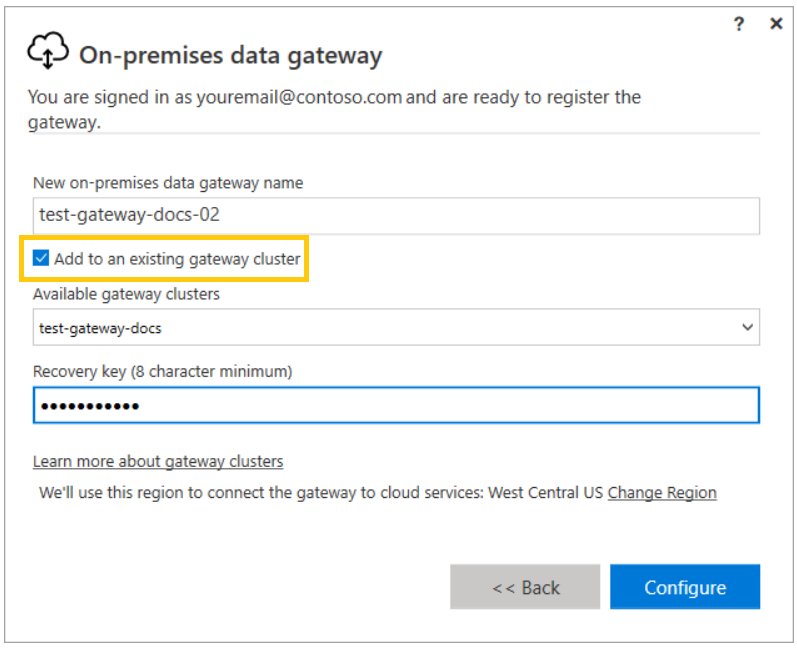
- Following is the option to add a new Gateway to add to an exiting Gateway Cluster.
- Because we can install only one standard gateway on a computer, we must install each additional gateway in the cluster on a different computer.
Refer this Docs article for more details.
🙂



 Rajeev Pentyala – Technical Blog on Power Platform, Azure and AI
Leave a comment