While pushing the code to Repo using ‘Command Line Script’ task in ADO pipeline, got the following permission issue.

- Following is the script used in ‘Command Line Script’ task to push the code to main branch.
echo commit all changes
git config user.email "rajeevpentyala@live.com"
git config user.name "Rajeev Pentyala"
git checkout main
git add --all
git commit -m "solution init"

echo push code to new repo
git  -c http.extraheader="AUTHORIZATION: bearer $(System.AccessToken)" push origin main
Reason for the issue:
- Account under which the ADO pipeline running, does not have required permissions to Push the code.
Fix:
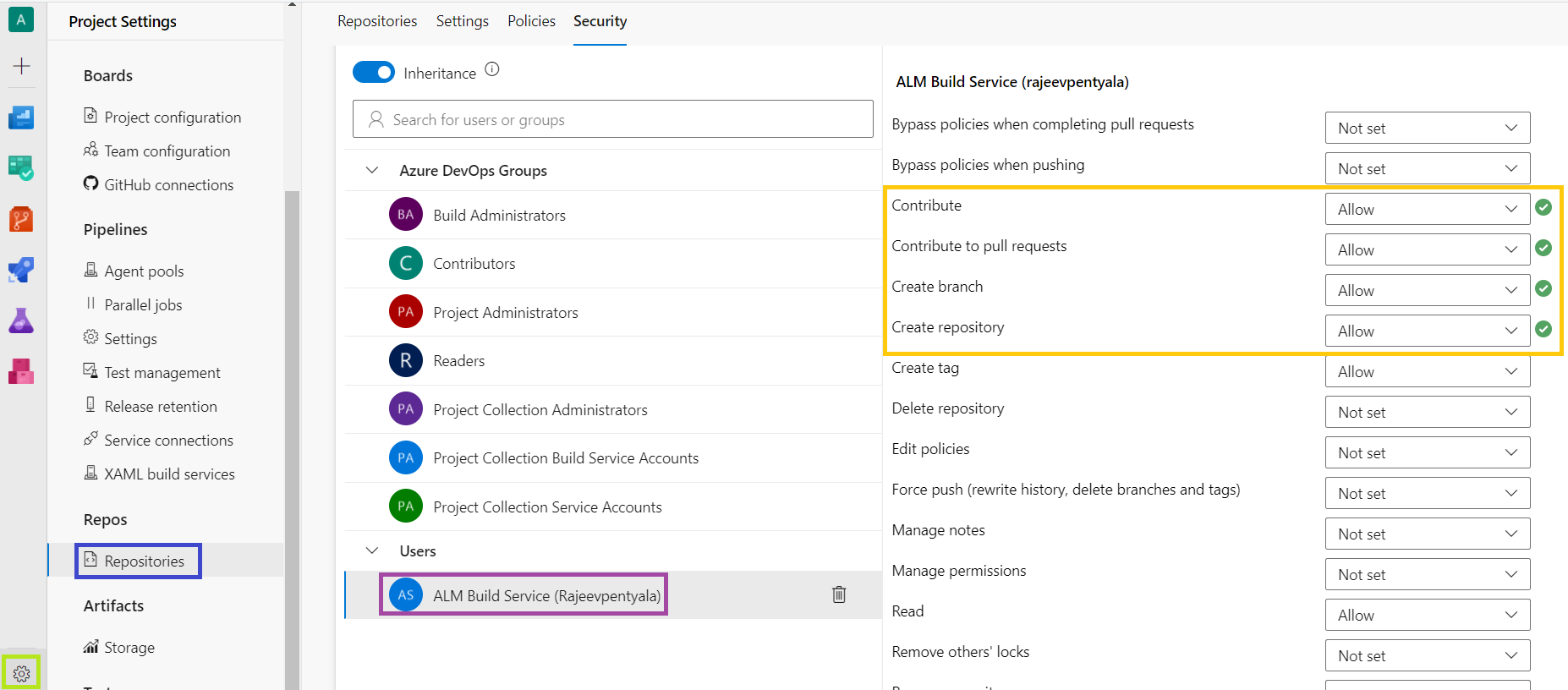
- Go to Settings -> Repositories
- Under ‘Security’ tab, select the ‘ALM Build Service(User_Name)‘ and grant highlighted privileges.
🙂


![[Step by Step] Beginner : Create a PCF control and add it to a custom page](https://rajeevpentyala.com/wp-content/uploads/2024/12/image-49.png)
 Rajeev Pentyala – Technical Blog on Power Platform, Azure and AI
Leave a comment