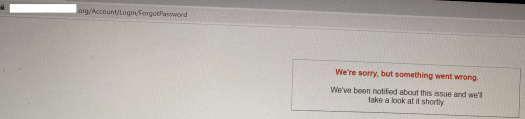
Few of our ADX portal users encountered an unhandled exception while resetting the Password using native ‘Forgot Password’ feature.
Reason:
- Its a sporadic issue only with few portal users.
- When checked the ‘Event viewer’ logs on Portal’s web server, there was this following warning with ‘Invalid Party Object Type 9’ exception message.
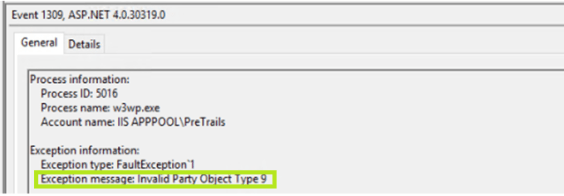
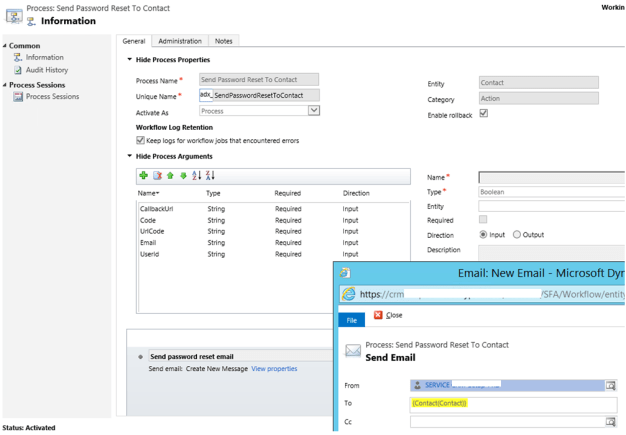
- In CRM, ‘Object Type 9’ denotes OOB ‘Team’ entity and the issue turns out to be with the ‘From’ field of ‘Send Password Reset To Contact‘ ADX process.
- In our requirement, we were setting ‘From’ field of ‘Send Password Reset To Contact’ process to owner of the ‘Portal User’ (i.e.,Contact).
- Portal user’s (i.e.,Contact) who owned by teams encountering this issue while triggering ‘Forgot Password’. As Email can’t be delivered when a ‘Team’ set as ‘From’.
Fix:
- Modified the ‘Send Password Reset To Contact‘ process by setting ‘From’ field to a ‘System User’ with Mail Box enabled. This made sure no ‘Team’ renders in ‘From’ field.
🙂




 Rajeev Pentyala – Technical Blog on Power Platform, Azure and AI
Leave a comment