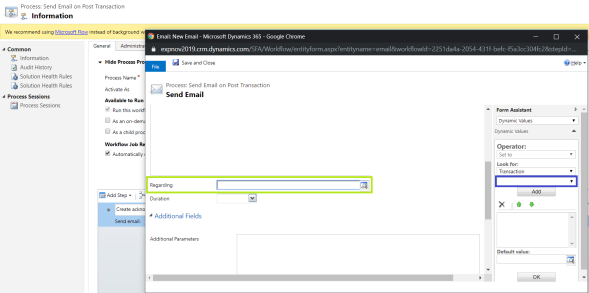
Other day, while working on a straight forward ‘Send Email’ using a ‘Workflow’, I could not set the ‘Regarding’ field on ‘Email’ form.
Scenario:
- Create a new custom entity ‘Transaction’.
- Send an Email when a new ‘Transaction’ record gets created.
So, I created a new workflow on ‘Transaction’ entity and added ‘Send Email’ step.

On the ‘Email’ configuration screen, all I could see was a blank ‘Look for:’ field.
Reason & Fix:
- ‘Activities’ option was not enabled on the ‘Transaction’ entity.

- Enable ‘Activities’ and publish.
- Go to the workflow and I got the Entity Reference in ‘Look for:’ field.

Its one of those days where we struggle for trivial problems 🙂



 Rajeev Pentyala – Technical Blog on Power Platform, Azure and AI
Leave a comment