In our Dynamics Portals, we got a requirement to show ‘Address Suggestions’ as and when the end user start typing the address.
We implemented the solution by consuming the Esri ArcGIS mapping service, from our Portal’s web page.
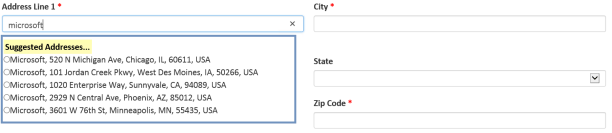
In this article lets see how to implement this at a high level.
What is ESRI ArcGIS?
- Its a cloud based mapping and analytics platform.
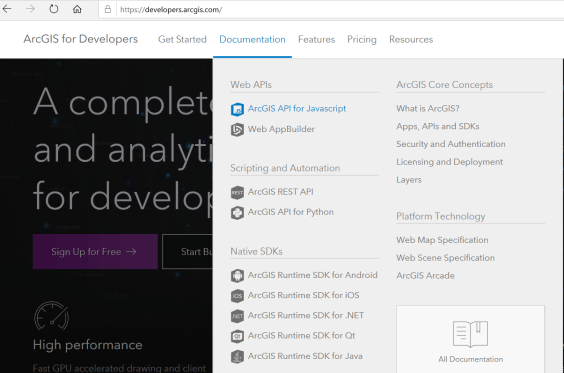
- For our ‘Address Suggestions’ requirement, we have consumed ESRI ArcGIS’s World Geocoding Service
- World Geocoding Service:
- Its part of ESRI ArcGIS.
- This Service finds addresses and places in all supported countries from a single endpoint.
- The service can find point locations of addresses, business names, and so on.
Steps to fetch ‘Address Suggestions’:
- To fetch the ‘Address Suggestions’, we have used findAddressCandidates operation of ‘World Geocoding Service’.
- findAddressCandidates operation is REST based and takes ‘Input address’ as parameter.
- As an example, to fetch the ‘Microsoft Office’ addresses in ‘Redmond’ the REST URL would be as follows:
https://geocode.arcgis.com/arcgis/rest/services/World/GeocodeServer/findAddressCandidates?SingleLine=Microsoft+Redmond&sourceCountry=USA&category=&outFields=*&forStorage=false&f=pjson
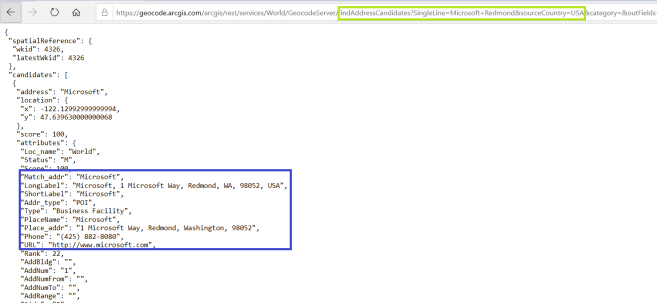
- In the above URL,
- ‘findAddressCandidates’ – Operation name.
- ‘SingleLine’ – Parameter which you need to pass address you are looking for (i.e., Microsoft+Redmond). Use + symbol to combine the words.
- ‘sourceCountry’ – Optional parameter. if provide, results will be specific to provided country code.
- Below is the sample script to call the service from Portal Web Page/Entity Form/ Web Templates.
function GetAddressrecommendations(address) {
var url = https://geocode.arcgis.com/arcgis/rest/services/World/GeocodeServer/findAddressCandidates?SingleLine=”+address+”&category=&outFields=*&forStorage=false&f=pjson;
// To limit the address to ‘United States’ country uncomment below line
// url += “&sourceCountry=USA”;var xhr = createCORSRequest(“GET”, url);
if (!xhr) {
throw new Error(“CORS not supported”);
}
xhr.onload = function () {
var text = xhr.responseText;
// Success and add logic to Parse the Response.
};
xhr.onerror = function () {
alert(“Unable to fetch addresses.”);
};
xhr.send();
}function createCORSRequest(method, url) {
var xhr = new XMLHttpRequest();
if (“withCredentials” in xhr) {
xhr.open(method, url, true);
} else if (typeof XDomainRequest != “undefined”) {
xhr = new XDomainRequest();
xhr.open(method, url);
} else {
xhr = null;
}
return xhr;
}
How to call the method?
- Call the GetAddressrecommendations function by passing the address you are looking for
- GetAddressrecommendations(‘Microsoft+Redmond’)
Notes:
- Esri ArcGis platform provides both hosted GIS services and a portal with a web UI and APIs for publishing, sharing, and managing content, maps, applications, and users.
- It has both Free and Paid services. Read the documentation before making the decision.
🙂


![[Step by Step] Beginner : Create a PCF control and add it to a custom page](https://rajeevpentyala.com/wp-content/uploads/2024/12/image-49.png)
 Rajeev Pentyala – Technical Blog on Power Platform, Azure and AI
Leave a reply to Victor Onyebuchi Cancel reply