We have ADX portal 7.0 solution installed on our Dynamics 365 8.2 application. We got a requirement to create a Web Form steps on a Custom Entity ‘Employee’.
‘Employee’ entity has an OOB ‘Information’ of ‘Form Type’ Main, with a tab named ‘Personal Details’.

Issue:
- While adding a Web Form step, there was no ‘Personal Details’ tab and could get only ‘general’ tab.
- In the new ‘WEB FORM STEP’, select the ‘Form Name’
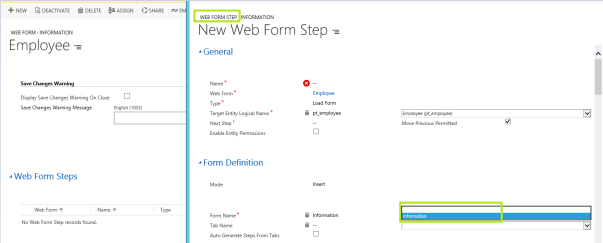
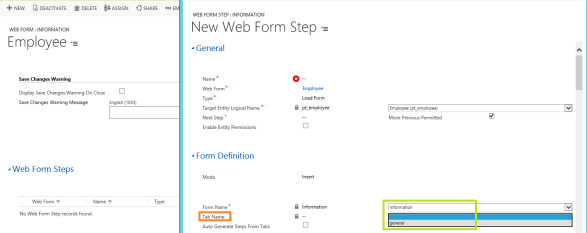
- In the ‘Tab Name’ drop down, there is no ‘Personal Details’ tab and all it had was ‘general’ tab.
Reason:
- As there were 2 OOB forms (i.e., Form Type ‘Main’, ‘Mobile – Express’) with the same name ‘Information’, ADX solution always picking ‘Mobile – Express‘ form which had a tab ‘general’
Fix:
- Renamed ‘Information’ Main form to ‘Employee’.

- Publish the solution
- Refresh the ‘Web Form Step’ and you should see ‘Personal Details’ tab once you select the ‘Employee’ form.

🙂


![[Step by Step] Beginner : Create a PCF control and add it to a custom page](https://rajeevpentyala.com/wp-content/uploads/2024/12/image-49.png)
 Rajeev Pentyala – Technical Blog on Power Platform, Azure and AI
Leave a comment