‘Help’ feature in Dynamics 365 is a useful and an intuitive way to provide guidance to the end users.
Sometimes we may get a requirement from customer to configure ‘Custom Help’ page.
Its simple to configure the custom help screen from Dynamics 365 ‘Admin Center’ Settings screen.
Steps to configure custom Help URL:
- Connect to your Office 365 Admin Center
- In the ‘Environments’ tab, select the instance and click on ‘Settings’

- In the ‘Settings’ screen, click on ‘Products -> Features’

- Under ‘Help features’, turn ON the “Custom help for customizable entities”.
- In the ‘Global custom help URL’, provide your custom web link.
- I provided my blog URL in this case.
- Select ‘Append parameters to URL’ option, if you want to pass the “typename”, “formid” etc.. parameters to your custom URL.
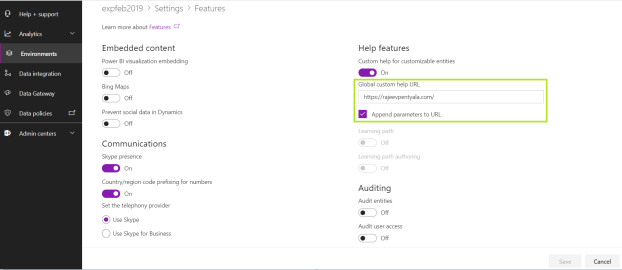
- Alternatively, you can also configure the same from ‘Administration -> System Settings’

Steps to test the Help URL:
- Connect to your dynamics instance.
- Click on Help(?) icon

- You will be redirected to the configured URL

🙂


![[Step by Step] Beginner : Create a PCF control and add it to a custom page](https://rajeevpentyala.com/wp-content/uploads/2024/12/image-49.png)
 Rajeev Pentyala – Technical Blog on Power Platform, Azure and AI
Leave a comment