I was getting below exception when I was trying to connect to D365 Web API from console.
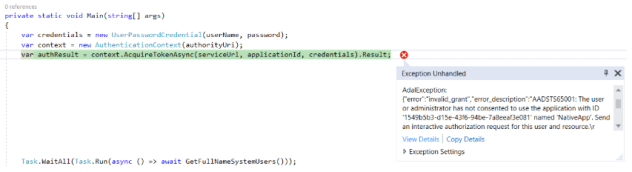
Reason:
- Issue was the Application registered on ‘Azure Active Directory’ was not granted the Permission
Fix:
- Connect to the Azure Active Directory admin center, using O365 credentials.
- Select the ‘Application’ from the ‘Azure Active Directory -> App registrations’
- Click on ‘Settings’ -> Required Permissions -> Click on ‘Grant permissions‘ button

Refer my previous article on how to register application and connect to D365 Web API
🙂


![[Step by Step] Beginner : Create a PCF control and add it to a custom page](https://rajeevpentyala.com/wp-content/uploads/2024/12/image-49.png)
 Rajeev Pentyala – Technical Blog on Power Platform, Azure and AI
Leave a comment