‘Portal Comment’ is an OOB activity which comes with Portal solution and enables peer-to-peer interactions between Portal Users and Dynamics Users.
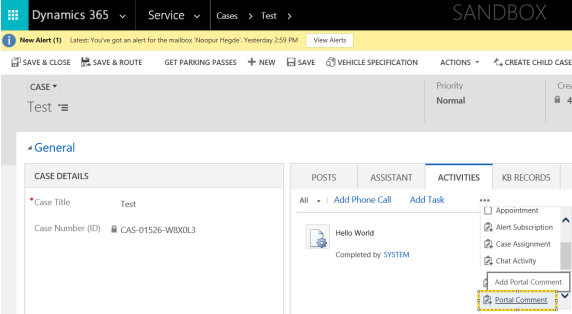
To add ‘Portal Comment’ for a record, go to ‘ACTIVITIES’ tab on the form and select ‘Portal Comment’.
Problem Statement:
- ‘Portal Comment’ added from Dynamics on a record not showing up in Portal.
- Below is a ‘Portal Comment’ added for Case record ‘Test’.
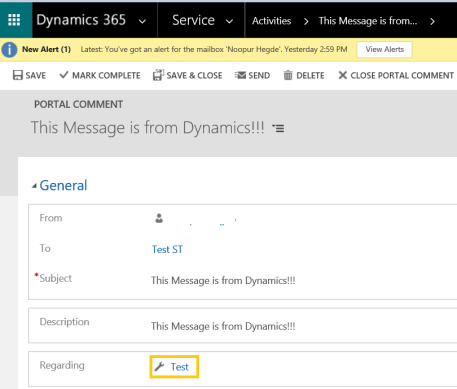
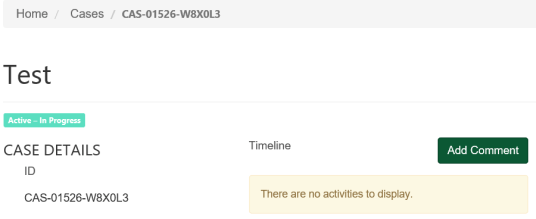
- It was not showing up on Case record on Portal
Reason and Fix:
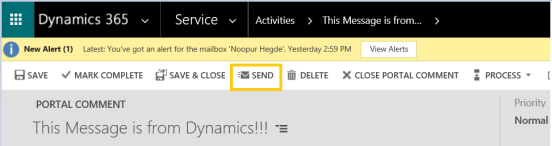
- ‘Portal Comment’ will only show up on Portal, when the ‘SEND’ button clicked (i.e, Status = Completed)
- Now, open the record in Portal and you should see the ‘Portal Comment’
- Note: Text added in ‘Description’ field of ‘Portal Comment’ will show up on Portal
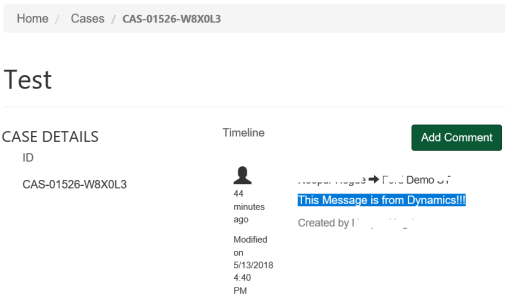
- ‘Portal Comment’ can also be added from Portal by using ‘Add Comment’ button and it will show up in ‘ACTIVITIES’ tab of the record.
🙂



![[Step by Step] Beginner : Create a PCF control and add it to a custom page](https://rajeevpentyala.com/wp-content/uploads/2024/12/image-49.png)
 Rajeev Pentyala – Technical Blog on Power Platform, Azure and AI
Leave a comment