We have 2 Portal solutions (i.e., Partner Portal and Custom Portal) enabled in our CRM organization and when I tried to configure ‘Custom Portal’ in a Web App, I could not, as the “Adxstudio Portals Website” drop down was disabled and defaulted to ‘Partner Portal’.
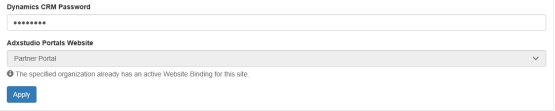
Reason:
- ‘Partner Portal’ solution configured first, and it created a record in ‘Website Bindings’.
- As design, portals defaults to ‘Partner Portal’ solution, if there was an active Website Binding.
Fix:
- Go to the ‘Website Bindings’ in CRM, by navigating to “Advance Find -> Website Bindings”.
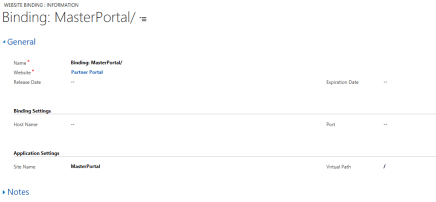
- Delete the website binding record
🙂



![[Step by Step] Beginner : Create a PCF control and add it to a custom page](https://rajeevpentyala.com/wp-content/uploads/2024/12/image-49.png)
 Rajeev Pentyala – Technical Blog on Power Platform, Azure and AI
Leave a comment