CRM 2013 has a new feature to display notifications (i.e., Errors,Warnings and Information’s) like a banner message using JavaScript.
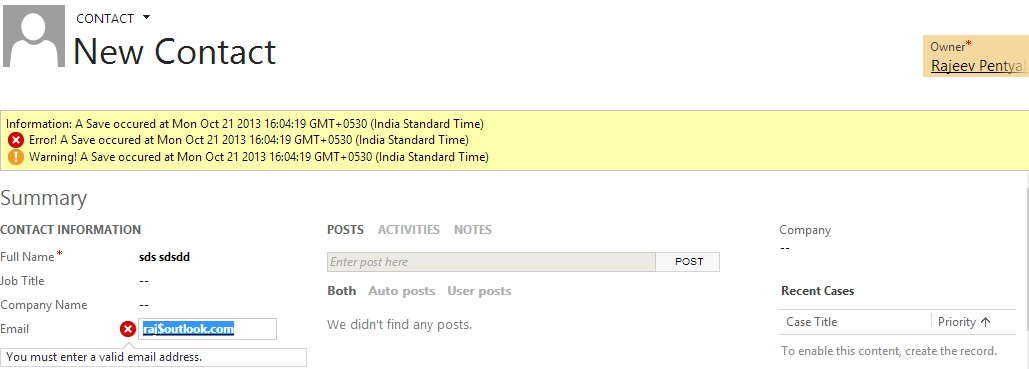
We can create both Form level notifications as well as Field notifications.
- Form notifications
- This method display notifications on the top of the record form.
Syntax – Xrm.Page.ui.setFormNotification(<Notification message>,’ ERROR\WARNING\INFORMATION’);

- Field notifications
Syntax – Xrm.Page.getControl(Field).setNotification(<Notification message>);

Observations
- The Save action happens even if you have form level error notifications
- The order of notifications are 1) Information notifications 2) Error notifications and 3) Warning notifications
- The banner only show 3 rows of notification, the user has to scroll down to see the other
- Use
Xrm.Page.ui.clearFormNotification()to clear the banner notifications
Refer this link for more details
🙂




 Rajeev Pentyala – Technical Blog on Power Platform, Azure and AI
Leave a comment