In CRM, the Associate or Disassociate event happens
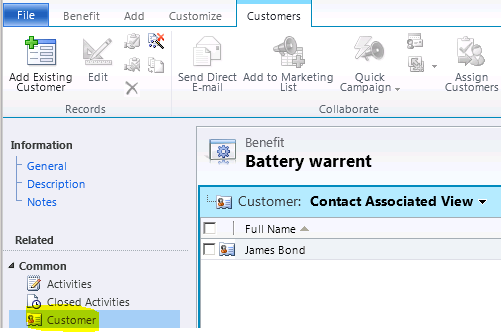
If you have a N:N relationship between two entities and when you try to associate or disassociate records either from Associated view or Sub grid.
Entity Associate View
In Plugins, the Associate & Disassociate messages behave little different than other messages.
When you register a plugin on Associate message, you have to leave “Primary and Secondary” entities as ‘none’.
Associate Plugin Step
Since we don’t provide entity names, the registered Plug-in step triggers on all “Associate” operations, so we have to check few conditions to let the “Association” trigger happen only between intended entities.
You can use the below code template for Associate or Disassociate plugins
EntityReference targetEntity = null;
string relationshipName = string.Empty;
EntityReferenceCollection relatedEntities = null;
EntityReference relatedEntity = null;
if (context.MessageName == “Associate”) {
// Get the “Relationship” Key from context
if (context.InputParameters.Contains(“Relationship”)) {
Associate\Disassociate is only for N:N relationship. For 1:N you can use Update Message, if you want to trigger a Plug-in when Primary Record changes by keeping Lookup field as ‘Filtering Attribute’
Suppose i have a custom entity Registration and Individuals and I have N:N relationship created. Below is my sample code not yet used in my plugin.
public static void AssociateIndividualsToRegistration(EntityReference individual, EntityReference registration, IOrganizationService service)
{
//Create EntityReferenceCollection for Individuals
EntityReferenceCollection relatedEntities = new EntityReferenceCollection();
//Add the related entity Individuals
relatedEntities.Add(individual);
//Add the Registration Individual relationship schema name
Relationship relationship = new Relationship(“poc_registration_individual”);
//Associate the Individual record to Registration
service.Associate(registration.LogicalName, registration.Id, relationship, relatedEntities);
}
Since I have never used Associate message, am curious to what does associate plugin will do exactly
For. eg.
Create message – when you create a new record and save.(do something)
Update message – when you update any fields on the form and save.(do something)
Delete message – when you delete a record or child record from subgrid(do something)
Similarly
associate message – when this will be triggered? I have the individual lookup field in Registration entity. I also see that when I save the registration record with individual lookup value selected. I see this record in registration entity associated view.
Please help me understanding the associate/disassociate plugin of CRM.
Associate – Triggers when you associate ‘Registration’ and ‘Individual’ (i.e., When you go to Associated View grid of either ‘Registration’ or ‘Individual’ and click ‘Add Existing button’)
Disassociate – Triggers when you remove either ‘Registration’ or ‘Individual’ records from Associated View grid.
Thanks for your blog post. Like Claus, I also had a problem with ToString() – however, it’s a different problem. I’m on Microsoft Dynamics 365 Version 1612 (8.2.1.271) (DB 8.2.1.271) online, and
gives me the real relationship name followed by a period. This was hard to catch since it looked right at a quick glance!
May I suggest you update your original post with Claus’ fix? That could save people some time in the future 🙂
I have a usecase where i would like to implement your strategy. I want to have a webhook with the “Associate” message handler who will redirect to a custom api i will build. This api would do some calculations and make some updates on some Dataverse entities. My question is where you should implement the code so it only triggers on a certain relation name.
[…] posted on Rajeev Pentyala – Microsoft Power Platform: In CRM, the Associate or Disassociate event happens If you have a N:N relationship between two […]






![[Step by Step] Configure and run 'Pipelines in Power Platform'](https://rajeevpentyala.com/wp-content/uploads/2024/08/image.png)
 Rajeev Pentyala – Technical Blog on Power Platform, Azure and AI
Leave a reply to Claus Appel Cancel reply