In CRM, we can debug the plug-ins deployed in “on premise” by following the steps in this article. But it’s always difficult to debug Plug-ins deployed in CRM online.
Now we can debug Plug-in code registered in both online/on premise also using “Plug-in Profiler”.
In CRM 2011, with the SDK 5.0.5 and later releases we got a “Plug-in Profiler” add-in along with Plug-in registration tool.
If you open the Plugin registration tool comes with latest SDK, it would look as below with profiler options.
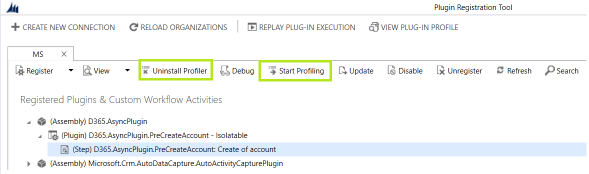
What all I need to debug, using “Plug-in Profiler”
- To debug using “Plug-in Profiler” all you need is
- Plugin assembly .dll
- Visual studio
- Plugin registration tool from latest SDK
How do I use “Plug-in Profiler”
- Check the Step by Step: Working with CRM2011 plugin profiler
- You can also refer, Analyze Plug-in Performance
Few more points
- “Plug-in Profiler” also provides offline debugging option using “Replaying plug-in execution”, it does not require a connection to a CRM server and organization.
- Support for registering and executing custom workflow activities in the sandbox is new in CRM 2011 UR 12 and the CRM December 2012 Service Update
🙂

![[D365 CE Online] Debug Async Plug-in | Rajeev Pentyala - Dynamics 365 Blog Avatar](https://rajeevpentyala.com/wp-content/uploads/2018/08/cropped-rajeev_pentyala.jpg?w=40)


 Rajeev Pentyala – Technical Blog on Power Platform, Azure and AI
Leave a reply to [D365 CE Online] Debug Async Plug-in using “Persist to Entity” profiler option – Nishant Rana's Weblog – Dynamics365Blogs Cancel reply