One of the key feature in CRM 2011 which was not exist in CRM 4.0 is “Auditing”
CRM 2011 has Out Of the Box Audit feature to audit the business data.
With the CRM 2011 Roll Up 5, we can also audit the users logon access with the feature “Audit User Access”
“Audit User Access” feature logs below information
- When the users logging on
- Where the access is originated from
- i.e., Notifies whether they access from CRM Web application, Outlook or SDK calls
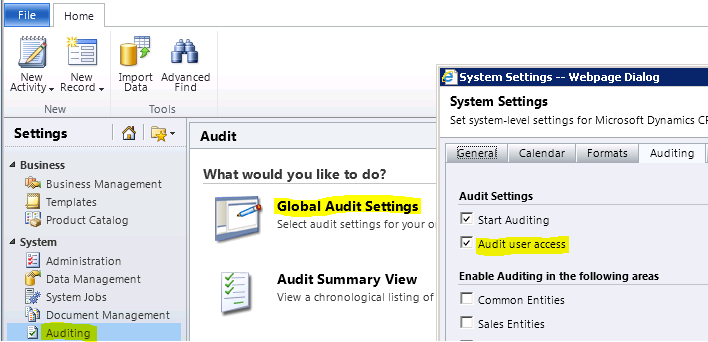
Enabling “Audit User Access” feature
- Go to “Settings –> Auditing –> Global Audit Settings”
- You get “System Settings” form
- Check “Audit User Access” checkbox
Auditing User Access
How to view the “Users Access” log
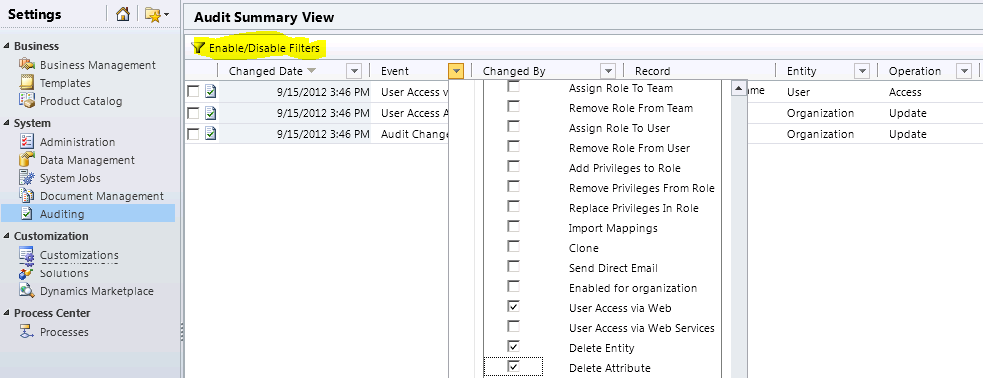
- Go to “Settings –> Auditing –> Audit Summary View”
- Click on “Enable/Disable Filters” to filter the audit summary
- Choose “Event” column on the grid and check the desire events
Audit Summary View Filter
A very useful link on Auditing Best Practices
🙂




 Rajeev Pentyala – Technical Blog on Power Platform, Azure and AI
Leave a comment