In CRM, partylist Party List is a data type, using which you can set more than one type of entity records for a single field
For example,
- In the ‘Appointment’ entity, field “requiredattendees” is a ‘Party List’ type
- We can select multiple records of different type (i.e., Accounts, Users, Contacts…)
In one of my requirement, I have to restrict the party list field to show only ‘Contacts’. (i.e., I can only choose Contacts)
We can achieve by setting below properties to partylist field using jscript
crmForm.all.requiredattendees.setAttribute(“defaulttype”, “2”);
crmForm.all.requiredattendees.setAttribute(“lookuptypes”, “2”);
crmForm.all.requiredattendees.setAttribute(“lookuptypeIcons”, “/_imgs/ico_16_2.gif”);
Here ‘2’ is the Entity Type Code of ‘Contact’ entity
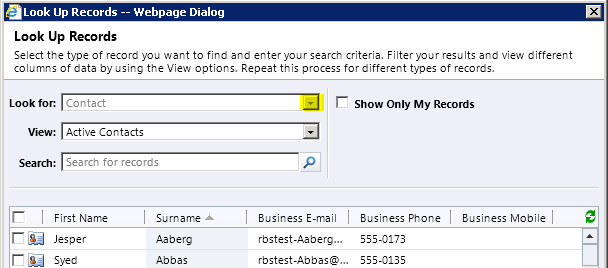
After setting the properties, the partylist look as below with ‘Contact’ chosen as default and in disabled state to restrict other entity selction
Filtered Party List
In case you have to filter 2 entities, let’s say Contact & User you have to set “lookuptypes & lookuptypenames & lookuptypeIcons” properties
lookuptypeIcons = ‘/_imgs/ico_16_2.gif:/_imgs/ico_16_8.gif’;
lookuptypenames = ‘contact:2:Contact,systemuser:8:User’;
lookuptypes = ‘2,8’;
crmForm.all.requiredattendees.setAttribute(“lookuptypes”, lookuptypes);
crmForm.all.requiredattendees.setAttribute(“lookuptypenames”, lookuptypenames);
crmForm.all.requiredattendees.setAttribute(“lookuptypeIcons”, lookuptypeIcons);
🙂




 Rajeev Pentyala – Technical Blog on Power Platform, Azure and AI
Leave a comment