Hi,
Below are the steps to get the GUID of record from CRM form URL.
- In the form ribbon, click on Copy a Link button in the Collaborate group.
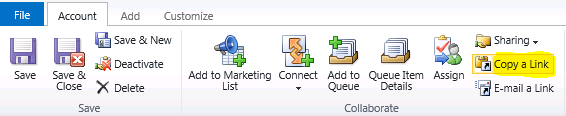
- Paste the URL on notepad.
- The ‘id’ parameter in the copied URL contains the encoded id value for the record.
- The brackets in the actual GUID “{” and “}” will be substituted with “%7B” and “%7D”, respectively.
- (i.e., Guid “{899D4FCF-F4D3-E011-9D26-00155DBA3819}”, comes as id=%7b 899D4FCF-F4D3-E011-9D26-00155DBA3819 %7d)
For example, in the below copied URL
The GUID is- 899D4FCF-F4D3-E011-9D26-00155DBA3819.
Hope it helps 🙂


![[Step by Step] Beginner : Create a PCF control and add it to a custom page](https://rajeevpentyala.com/wp-content/uploads/2024/12/image-49.png)
 Rajeev Pentyala – Technical Blog on Power Platform, Azure and AI
Leave a reply to Liliana Cancel reply