Hi,

Below is the code snippet to create a record (i.e., Account) using OData & JQuery.

//Prepare ‘Account’ object and call create function

function createAccount() {

//Create an object to represent an Account record and set properties

var account = new Object();

// Set text field

account.Name = “Rajeev Pentyala”;

// Set Lookup field (Contact should exists in the system)

var primaryContact = new Object();

primaryContact.ContactId = “”;

primaryContact.FullName = “”;

//    if (primaryContact != null) {

//        account.PrimaryContactId = { Id: primaryContact.ContactId, LogicalName: “contact”, Name: primaryContact.FullName };

//    }

//Set a picklist value

account.PreferredContactMethodCode = { Value: 2 };

// Set a money value (i.e., Annual Revenue)

account.Revenue = { Value: “2000000.00” };

// Set a Decimal field (Here ‘new_DecimalField’ is my custom Account field)

account.new_DecimalField = 200.00.toString();

// Set a Boolean value

account.DoNotPhone = true;

// Set Date field (Here ‘new_DateField’ is my custom Account field)

var myDate = new Date();

myDate.setFullYear(1980, 12, 29);

account.new_DateField= myDate;

// Call create method by passing

// (i) Entity Object (i.e.,account in this case)

//(ii) Entity Set

//(iii)SuccessCallback function

// (iv) Error callback function

createRecord(account, “AccountSet”, createAccountCompleted, null);

}

// This callback method executes on succesful account creation

function createAccountCompleted(data, textStatus, XmlHttpRequest) {

var account = data;

alert(“Account created; Id: ” + account.AccountId.toString());

}

// This function creates record by making OData call

function createRecord(entityObject, odataSetName, successCallback, errorCallback) {

//Parse the entity object into JSON

var jsonEntity = window.JSON.stringify(entityObject);

// Get Server URL

var serverUrl = Xrm.Page.context.getServerUrl();

//The OData end-point

var ODATA_ENDPOINT = “/XRMServices/2011/OrganizationData.svc”;

//Asynchronous AJAX function to Create a CRM record using OData

$.ajax({

type: “POST”,

contentType: “application/json; charset=utf-8”,

datatype: “json”,

url: serverUrl + ODATA_ENDPOINT + “/” + odataSetName,

data: jsonEntity,

beforeSend: function (XMLHttpRequest) {

//Specifying this header ensures that the results will be returned as JSON.

XMLHttpRequest.setRequestHeader(“Accept”, “application/json”);

},

success: function (data, textStatus, XmlHttpRequest) {

if (successCallback) {

successCallback(data.d, textStatus, XmlHttpRequest);

}

},

error: function (XmlHttpRequest, textStatus, errorThrown) {

if (errorCallback)

errorCallback(XmlHttpRequest, textStatus, errorThrown);

else

alert(“Error on the creation of record; Error – “+errorThrown);

}

});

}

How do I call this method :-

  • Create a new .jscript file (i.e., “account.js”)
  • Copy & Paste above code
  • Add “account.js” as a webresource in CRM
  • Add “Json2.js” & “jquery1.4.1.min.js” helper script files as webresources
  • You can get the helper files from CRM 2011 SDk under path “\sdk\samplecode\js\restendpoint\jqueryrestdataoperations\jqueryrestdataoperations\scripts”
  • Add “createAccount” function to form load method (Refer below)
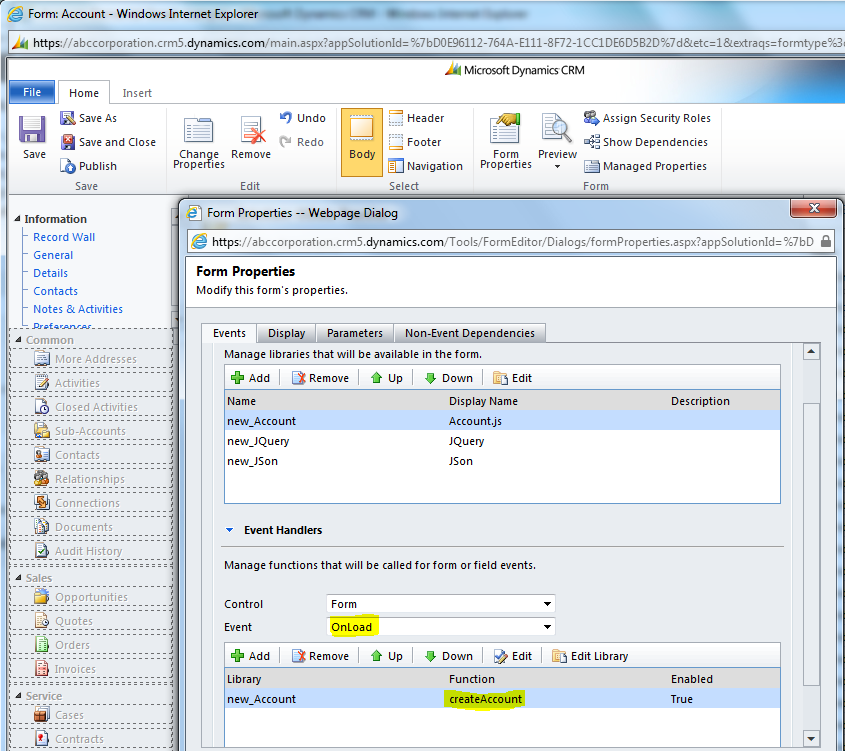
Adding webresources to account form
Adding webresources to account form
  • Save & Publish
  • Open any account record and on loading of record our script fires and it creates new account name “Rajeev Pentyala”

Hope it helps 🙂

Advertisements
Advertisements

13 responses to “Create record using OData and JQuery in CRM 2011”

  1. nmathur Avatar

    Hi Rajeev Ji,

    Thanks for this post. I tried your code and but I don’t know way it was not working when I added “Json2.js” & “jquery1.4.1.min.js” helper script files. And after added “jquery.1.4.1.js” your code worked fine.
    Why your code work with only two support files and I need three. Please reply me if you have any idea.

    Thanks in advance.

  2. Rajeev Pentyala Avatar

    Hi,
    “Jquery.1.4.1.min.js” is minified version.
    I am able to create records with minified version.

    Please double check the file you used.
    OR
    Use the “jquery1.4.1.min.js” file which comes with CRM 2011 SDK (Refer path below)
    \sdk\samplecode\js\restendpoint\jqueryrestdataoperations\jqueryrestdataoperations\scripts

  3. Susan Avatar
    Susan

    Hi Rajeev,

    I am facing a strange problem while I try to create an opportunity entity record using the same javascript.

    I am using the above code and also the JQueryRESTDataOperations sample from SDK/MSDN which sets the Revenue field account , the only difference is that I set he value for new_totalamount field in opportunity record.

    I am trying to set the custom attrbute Total Amount value equal to 100 when I get this error.
    the code I use is
    opp.new_TotalAmount = { Value: “100.00” }; //Set Total Amount

    The error is as : “Error processing request stream. The type name ‘Microsoft.Crm.Sdk.Data.Services.OptionSetValue’ is not valid for the given URI it represents. The expected type must be ‘Microsoft.Crm.Sdk.Data.Services.Money’ or one of its derived types.”

    This is very strange as I am able to create the entity record if I comment this line. Also I have double check with the attribute name and type, it is a currency type attribute.

    Please can you help me out.

    Thanks

    1. Rajeev Pentyala Avatar

      Hi Susan,

      I am able to create record with currency field with the same syntax provided in SDK

      myProd.new_Revenue = { Value: “100.00” };

      I wonder why it’s not working in your case.

      As workaround, try creating object and set the currency value as below
      var objRevenue = new Object;
      var amount = 100;
      myProd.new_Revenue = { Value: eval(amount).toString() };

      If it does not work, delete and recreate the field or send me the solution with your entity customization to dig deeper.

      Thanks,
      Rajeev

  4. Saurin Avatar
    Saurin

    Hi Rajeev,
    I am getting an error while setting a decimal value, the code works for money attribute but even after trying numerous formatting and conversions for decimal, it doesn’t work.

    account.Quantity = { Value: eval(1) };
    or
    account.Quantity = 1;
    or
    account.Quantity = { Value: “1” };

    1. Rajeev Pentyala Avatar

      Hi Saurin,
      Try this

      // Set a Decimal field (Here ‘new_DecimalField’ is my custom Account field)
      account.new_DecimalField = 200.00.toString();

      Let me know if you still face issue

  5. ihsacrm Avatar
    ihsacrm

    Error on the creation of record; Error
    How can I find out what the actual error isÉ
    Thanks!

  6. ihsacrm Avatar
    ihsacrm

    …sory, there was an error posting previous message!

    Error on the creation of record; Error – [object Error]
    Any idea?

  7. David Avatar

    I am getting the message:
    Error on the creation of record; Error – [object Error]

    Please advice !

    1. Rajeev Pentyala Avatar

      Hi,
      Note that all the properties are Case sensitive
      var primaryContact = new Object();
      primaryContact.ContactId = “123”;
      Here “ContactId” should be of same case. Use ODataQueryDesigner to get the properties.

  8. Seema Avatar
    Seema

    Hi Rajeev,
    Thank you for the post.I am new to the CRM.I use the trial version CRM 2013. When i tried this, the error callback function is called.I am unable to find where the fault is…
    Can you help me in this!!

Leave a reply to ihsacrm Cancel reply