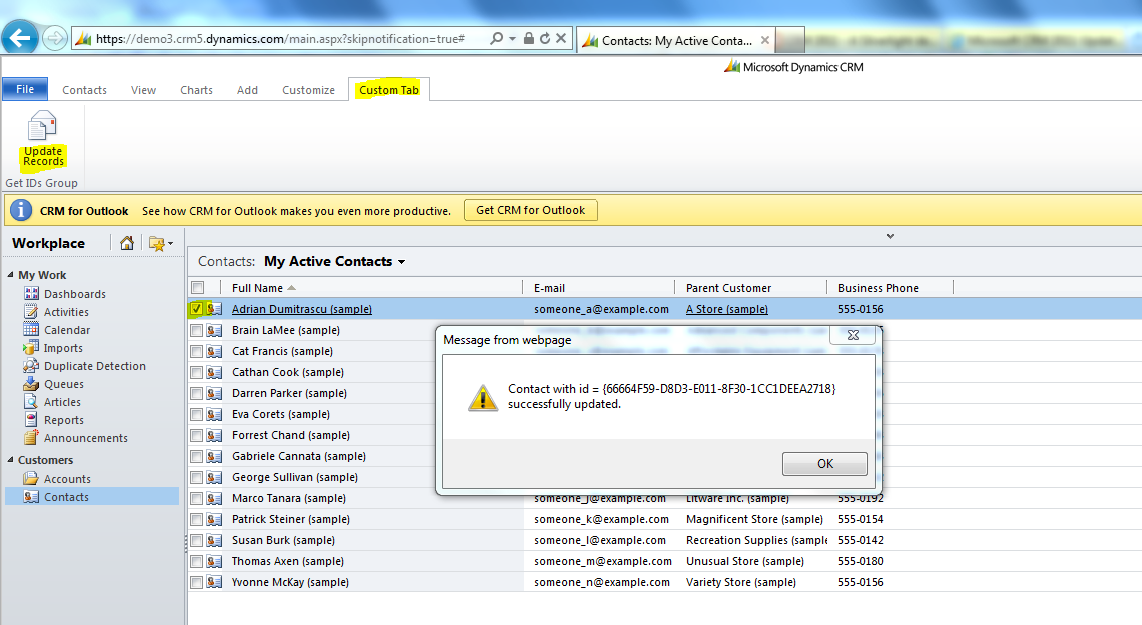
We are passing “SelectedControlSelectedItemIds” (i.e.,Selected record Guid’s) to the JScript function. Multiple Id’s seperate by ‘,’.
We are done with customization part, zip the files and Import the solution & publish all customizations.
Clear the cache and refresh the browser and you will get the custom tab with “Update Records” button.
** Below are few more key <CrmParameterValue> that can be passed as parameter **
SelectedEntityTypeCode : A number representing the unique type of entity for a record selected in a grid. The Entity type code will vary
between deployments. SelectedEntityTypeName : A string representing the unique name of the entity for a record selected in a grid. FirstSelectedItemId : Provides one GUID identifier as a string for the first item selected in a grid. SelectedControlSelectedItemCount : The number of selected items in a grid.
SelectedControlSelectedItemIds : A string array of GUID Id values for all selected items in a grid.
SelectedControlAllItemCount : A string array of GUID Id values for all selected items in a grid. SelectedControlAllItemIds : A string array providing the GUID Id values for all items displayed in a grid. SelectedControlUnselectedItemCount : The number of unselected items in a grid. SelectedControlUnselectedItemIds : A string array of GUID Id values for all unselected items in a grid.
Thanks for this post, it is very useful. But I am having an issue regarding an example similar to your post. I hope you can help me with that.
To update selected records I am using OData and JQuery and to give reference for Json2.js” & “jquery1.4.1.min.js” helper script files I tried following in customizations.xml
When I use above code I get this error:
“Error initializing component with element id=’lookupFilterPopupcrmGridrn_myentitycreatedby’ and with type=’Mscrm.LookupFilterPopup’: Unable to set value of the property ‘lookupstyle’: object is null or undefined.”
Hi Mathur,
When you update the record from ribbon button placed on entity grid, the helper script files wont get loaded by default.
Thats the reason you get $ undefined error.
To fix this, you have to load the script files dynamically. This post would help you.
I tried what you said and I am still getting error that –
Error initializing component with element id=’lookupFilterPopupcrmGridnew_myentitycreatedby’ and with type=’Mscrm.LookupFilterPopup’: Unable to set value of the property ‘lookupstyle’: object is null or undefined
I am sharing full error log with you,
Microsoft Dynamics CRM Error Report Contents
1.0
Error initializing component with element id=’lookupFilterPopupcrmGridnew_myentitycreatedby’ and with type=’Mscrm.LookupFilterPopup’: Unable to set value of the property ‘lookupstyle’: object is null or undefined
Hey Rajeev, thank you so much …. it was my mistake. I was missing jquery1.4.1.js. By code is working after trying this:
var JScriptminWebResourceUrl = “http://crm2011:5555/dynamics/WebResources/rn_jquery1.4.1.min.js”;
var xmlHttp = new ActiveXObject(“Microsoft.XMLHTTP”);
xmlHttp.open(“GET”, JScriptminWebResourceUrl, false);
xmlHttp.send();
eval(xmlHttp.responseText);
var JScriptWebResourceUrl = “http://crm2011:5555/dynamics/WebResources/rn_jquery1.4.1.js”;
var xmlHttp1 = new ActiveXObject(“Microsoft.XMLHTTP”);
xmlHttp1.open(“GET”, JScriptWebResourceUrl, false);
xmlHttp1.send();
eval(xmlHttp1.responseText);
var JSONWebResourceUrl = “http://crm2011:5555/dynamics/WebResources/rn_json2.js”;
var xmlHttp2 = new ActiveXObject(“Microsoft.XMLHTTP”);
xmlHttp2.open(“GET”, JSONWebResourceUrl, false);
xmlHttp2.send();
eval(xmlHttp2.responseText);
and then update ………………….
Thanks you soooooooooo much .. you made my day 🙂
Jerry J
After updating the selected Contact records I need to either refresh the grid or unselect the selected records. What is the best method for doing that? I can reload the form but it goes back to the default view.


![[Step by Step] Configure and run 'Pipelines in Power Platform'](https://rajeevpentyala.com/wp-content/uploads/2024/08/image.png)
![[Step by Step] Beginner : Create a PCF control and add it to a custom page](https://rajeevpentyala.com/wp-content/uploads/2024/12/image-49.png)
 Rajeev Pentyala – Technical Blog on Power Platform, Azure and AI
Leave a reply to Jerry J Cancel reply