This topic is from the the Microsoft CAT team’s Copilot Studio Implementation Guide— a PPT with over 160 pages of practical insights and best practices. If you work with Copilot Studio, you should definitely check it out!
In this blog post, I want to highlight the Copilot Studio Credit Consumption topic from the guide. I found it incredibly useful and wanted to share.
Before we dive into how credit consumption works, let’s first understand Copilot Credits.
What are Copilot Credits:
- Copilot Credits are the common currency across Copilot Studio capabilities.
- Copilot Credits measure the time and effort your agent needs to retrieve information, respond to prompts, and use any actions or custom skills.
- The number of Copilot Credits counted for each response or action depends on the complexity of the task the agent completes.
Now that we understand the basics, let’s look at how credit consumption actually works.
Every time you chat with a Copilot Studio Agent, you spend credits — but how many depends on the type of question you ask.
💬 How Credit Consumption Works in Copilot Studio
- 1️⃣ Regular Question — 1 Credit
If your question is a regular, non-AI topic, you’re charged 1 credit, no matter how many messages the agent sends back.
You ask your Copilot: “What are the new laptop options for me?”
→ That’s a regular topic, so it costs 1 credit. Easy! - 2️⃣ Generative Answer — 2 Credits
If the agent uses Generative AI to write a fresh answer — summarizing or explaining something — it costs 2 credits, even if it replies with just one message.
You ask your Copilot: “Can you summarize the setup guide for product XYZ?”
→ The agent uses AI to craft a response — 2 credits spent. - 3️⃣ Tool or Workflow — 5 Credits
If your question triggers a workflow or external tool, the entire exchange counts as 5 credits.
You ask your Copilot: “Can you create a new ticket in ServiceNow?”
→ The agent connects to the system and completes the task — 5 credits total
Refer the slide from the guide.

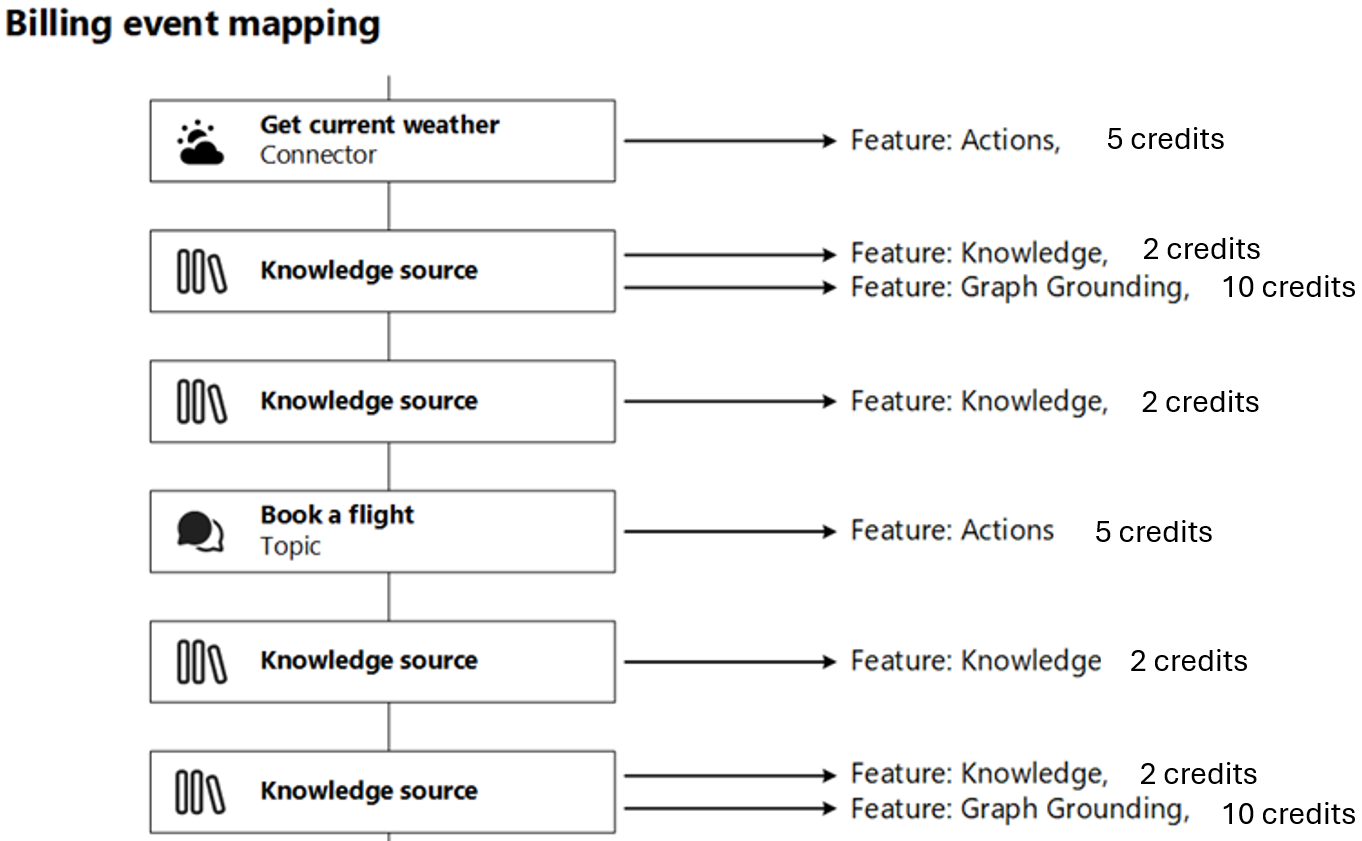
Now that you know how each type of conversation consumes credits, let’s look at what happens behind the scenes when your Copilot uses different features.
Understanding Credit Burn Rate
Every time your Agent performs an action, retrieves information, or grounds its answers in data, it triggers a billing event.
Each of these events consumes credits depending on the feature being used.
Refer this slide from the guide:
Hope you found this overview useful and that it helps you better understand how Copilot Studio Credits are consumed.
🙂



 Rajeev Pentyala – Technical Blog on Power Platform, Azure and AI
Leave a comment