If you are unfamiliar with configuring Azure AD B2C as a Power Pages Identity Provider, refer to this post: Power Pages : Set up Azure AD B2C
We have our Power Pages website configured with Azure AD B2C as Identity Provider.

Our portal users successfully completed their registration by validating their email ID. However, upon logging into the portal, they were redirected to the Profile screen with the following message:
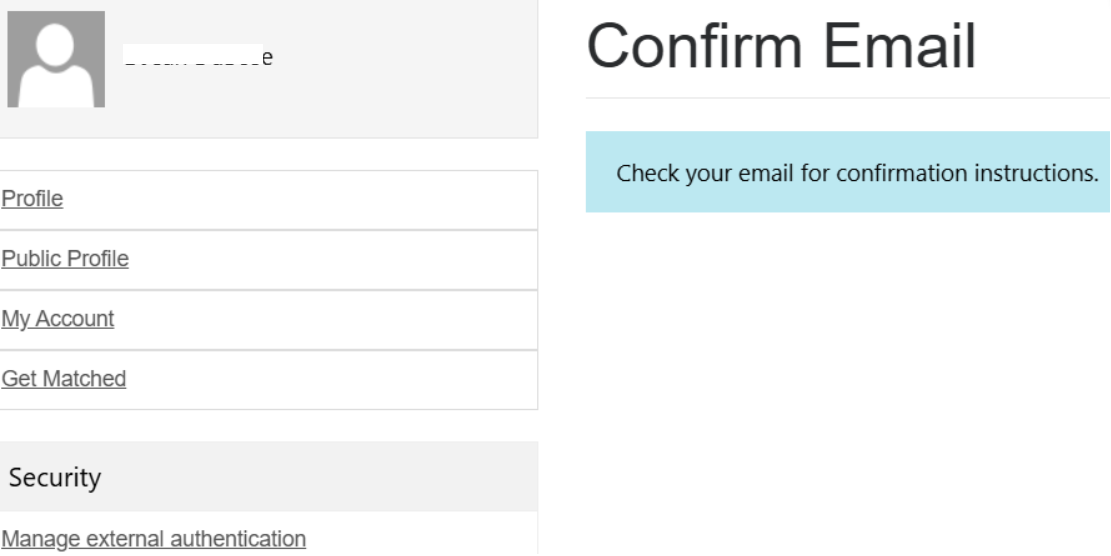
The reason for this behavior, Power Pages supposed to set the Email Confirmed to true. But for few Users Email Confirmed not getting set to true even after email validation.

Fix:
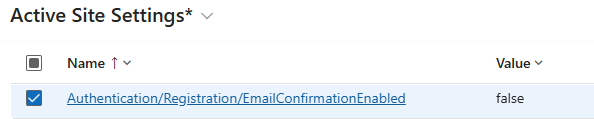
We updated following Site Settings
- Authentication/Registration/EmailConfirmationEnabled – false
- Set this to false. Please note that the Azure AD B2C registration flow will still validate the email.
- Authentication/Registration/ProfileRedirectEnabled : false
- Optional setting. Setting it to false will prevent portal users from being redirected to the Profile page every time they sign in.
Ensure you restart the Power Pages website after updating the Site Settings.
🙂



 Rajeev Pentyala – Technical Blog on Power Platform, Azure and AI
Leave a comment