Please refer to one of my previous articles Prepare and Execute FetchXML Liquid Template Tag on how to use the FetchXML in Liquid Tag.
In this article, I will explain how to read a Choice field value, as reading Choice field values is a bit different.
Here is my sample Liquid tag with FetchXML:
  {% assign portalId = request.params['contactid'] %}
 {% fetchxml contactDetails %}
      <fetch version="1.0" output-format="xml-platform" mapping="logical" distinct="false">
        <entity name="contact">
          <attribute name="fullname" />
          <attribute name="raj_cancellationoptions" />
          <filter type="and">
            <condition attribute="contactid" operator="eq" value="{{ portalId }}" />
          </filter>
        </entity>
      </fetch>
    {% endfetchxml %}
In my FetchXML, the field Cancellation Options is a Choice field with 3 options.
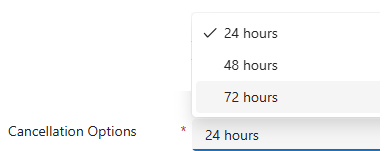
Here is the logic to retrieve and display the Cancellation Options field:
 {% if contactDetails.results.entities.size > 0 %}
 {% assign contact = contactDetails.results.entities[0] %}
<div>{{ contact.fullname }}</div>
<!--Reading 'Cancellation Options' Choice field-->
<div>
{% case contact["raj_cancellationoptions"].value %}
        {% when '921720000' %}24 hours
        {% when '921720001' %}48 hours
        {% when '921720002' %}72 hours
        {% else %}No cancellation option available.
{% endcase %}
</div>
Hope this example save your time 🙂


 Rajeev Pentyala – Technical Blog on Power Platform, Azure and AI
Leave a comment