Let’s say you have a Dataverse table called Demo Customers and you want to send an email every time the Email field changes.

We can create a cloud flow with a Dataverse Trigger When a row is added, modified or deleted as shown below.

Everything looks great, right? Not really. The flow triggers on the change of any field. For example, if we update the ‘Name’ field, it will still trigger the flow.

What if we want to trigger the flow only when the Email field is updated and not when other fields are changed?
Use ‘Select columns’:
- Use the Select columns to define the specific columns of the row that should cause the flow to run, as a comma-separated list of unique column names.
- Since we want our flow to trigger only when the Email field is updated, provide the logical name of the Email field in the Select columns.

- Now, test the flow by first updating the Name field. This should not trigger the flow. However, updating the Email field will cause the flow to run.
To summarize the above example, use Select Columns if you want your flow to trigger only when specific fields are updated (for example, the ‘Email’ field in our scenario).
Let’s add one more condition to our scenario. I want my flow to trigger on the Email field update, but only if the record’s Name field contains ‘John.’ For this, we need to use Filter Expression
Using ‘Filter Expression’:
- The filter expression provides a way for you to define an OData style filter expression to help you to define the trigger conditions even more precisely.
- The flow runs only when the expression evaluates to true after the change is saved in Dataverse.
Let me add an expression contains(firstname,’John’)
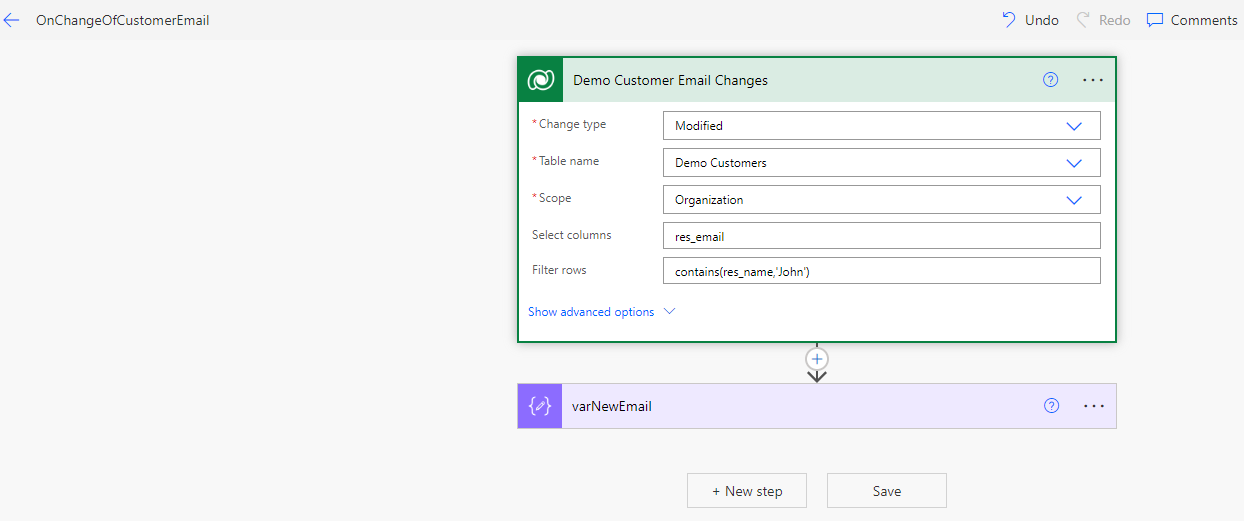
- Now, test the flow. First, change the Email field and verify that the flow does not run. Next, change the Name of the record to ‘John’ and save the record. The flow should run now.

In summary, use Select columns if you want your flow to trigger only when specific fields are updated. Use Filter Expression to define an OData-style filter expression, allowing you to specify the trigger conditions even more precisely.
🙂


 Rajeev Pentyala – Technical Blog on Power Platform, Azure and AI
Leave a comment