Assume that you are building a Canvas app using ‘Accounts’ table of Dataverse datasource and you need to show a button only if the logged in user has ‘Delete’ permission on ‘Accounts’ table.
We can easily fulfill above requirement using DataSourceInfo function.
DataSourceInfo function provides information about a particular column of a data source also permission details (i.e., Whether the User has Create, Read, Write, Delete permissions).
For example, to get the ‘Display Name’ and ‘Max Length’ of a column you can use DataSourceInfo as below.
- “MaxLength of ‘name’ column is – “& DataSourceInfo(Accounts, DataSourceInfo.MaxLength, “name”)

DataSourceInfo function provides following information.
Column information:
You can use DataSourceInfo to obtain following information about a column of a data source:

Fetch User Permissions:
We can also determine whether the user has a specific permission on a data source.

To know whether the logged in User has ‘Delete’ permission on ‘Accounts’ table. You can use following formula.
- “Does the current user has ‘Delete’ permission – “& DataSourceInfo( Accounts, DataSourceInfo.DeletePermission)
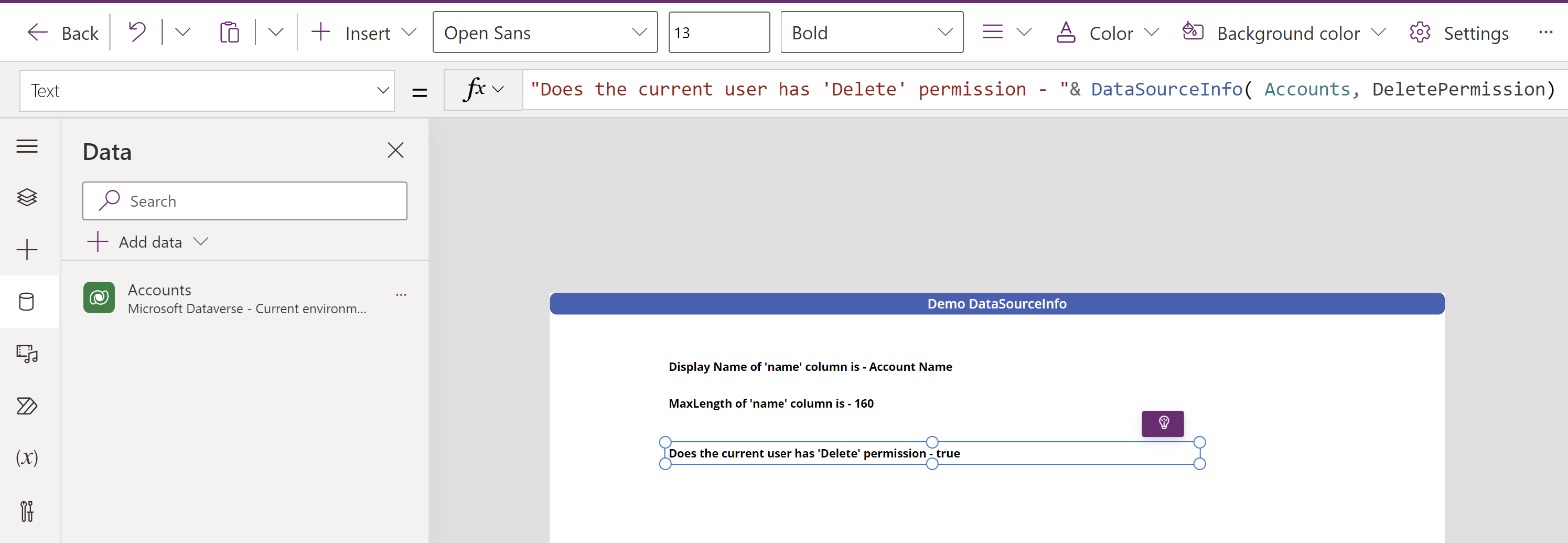
Finally, to show a button only if the User has ‘Delete’ permission, simply write following formula on the ‘Visible’ property of the button.
- DataSourceInfo( Accounts, DataSourceInfo.DeletePermission)

To conclude, Data sources can provide a wealth of information to optimize the user experience and use DataSourceInfo function to untap it.
🙂



 Rajeev Pentyala – Technical Blog on Power Platform, Azure and AI
Leave a comment