If you want to imply password policy (i.e., Certain length, must have a digit, etc…) during the portal registrations, following entries need to be added to ‘Site Settings’ entity.

| Name | Value |
| Authentication/UserManager/PasswordValidator/AlphanumericUserNames | TRUE |
| Authentication/UserManager/PasswordValidator/RequireDigit | TRUE |
| Authentication/UserManager/PasswordValidator/RequiredLength | 9 |
| Authentication/UserManager/PasswordValidator/RequireLowercase | TRUE |
| Authentication/UserManager/PasswordValidator/RequireNonLetterOrDigit | TRUE |
| Authentication/UserManager/PasswordValidator/RequireUppercase | TRUE |
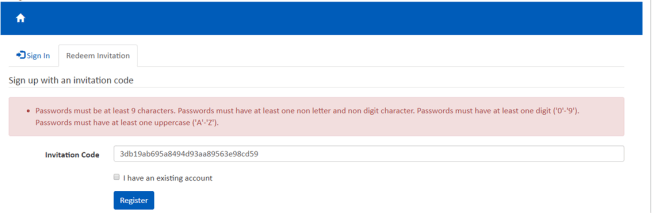
If the password does not meet any of the configured setting values, you gonna get OOB validation error as follows:
For more ‘Authentication’ related settings, refer the article
Refer this article for portals client scripting.
🙂



![[Step by Step] Beginner : Create a PCF control and add it to a custom page](https://rajeevpentyala.com/wp-content/uploads/2024/12/image-49.png)
 Rajeev Pentyala – Technical Blog on Power Platform, Azure and AI
Leave a comment