You would have got “An unknown failure has occurred…” many times in your portal when there was exception thrown by your Dynamics CE plug-in code.
Now in Dynamics Portals, we can show the plug-in error in following portal screens by adding “Site/EnableCustomPluginError” entry in Dynamics CE Portals -> Site Settings
- Entity list
- Retrieval of records
- Entity form
- Retrieve
- Create/Update and so on
- Web forms
- Retrieve
- Create/Update and so on
Lets see the approach and steps.
- I have created and registered a plug-in with logic to intentionally throw an exception on ‘Case’ Create.
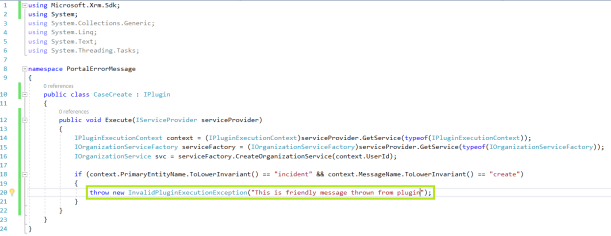
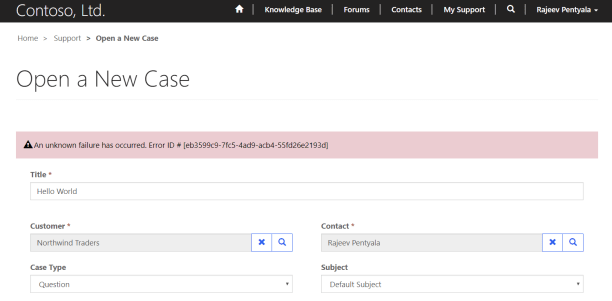
- Go to your Portal and try to create a Case and you would get below generic exception “An unknown failure…”
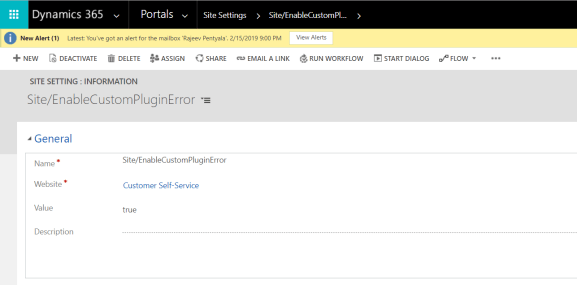
- Now open your Dynamics CE application, navigate to Portals -> Site Settings and create a new Site Setting with Name “Site/EnableCustomPluginError” and Value true.
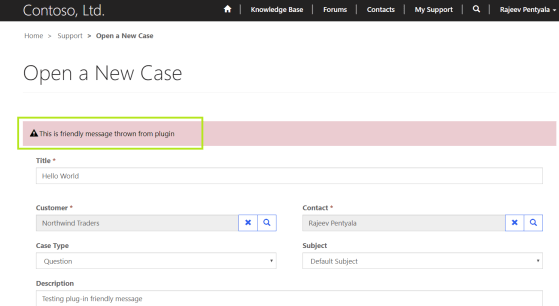
- Go back to your Portal and try to create a Case and you would get actual Plug-in error.
🙂



![[Step by Step] Beginner : Create a PCF control and add it to a custom page](https://rajeevpentyala.com/wp-content/uploads/2024/12/image-49.png)
 Rajeev Pentyala – Technical Blog on Power Platform, Azure and AI
Leave a comment