We recently working on Data migration from CRM 2011 on-premise to Dynamics 365.
We got the CRM 2011 SQL DB back up, which we restored in our SQL server. But when we run query on ‘Filtered’ views we were getting 0 results.
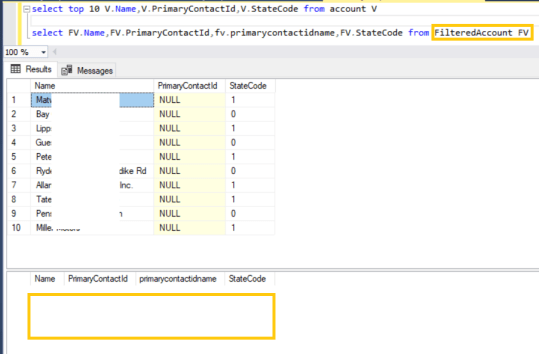
Reason:
- FilteredViews always run on CRM User context
- The account I logged in to SQL server is not a CRM User/Service Account and hence Filteredview returning 0 results
Fix:
- Before you querying ‘Filtered’ view, set the Context to CRM User using GUID
- Below is the syntax:
— Set the Context
DECLARE @userid uniqueidentifier;
SET @userid = convert(uniqueidentifier, ‘123A81A3-89C3-E411-B6EF-441EA155CAB5’);
SET CONTEXT_INFO @userid;–Execute the query
Select top 10 name,statecode,statecodename from FilteredAccount (nolock)
- GUID used in above query is the valid CRM user’s GUID.
- Now we should get the Accounts based on the Privilege and Access level of the User GUID we set the context with.




 Rajeev Pentyala – Technical Blog on Power Platform, Azure and AI
Leave a comment