I was building a console application to transact with large set of data in a SQL table and got a requirement to bulk update records.
Below are the options I got.
Option 1:
- Loop through the records in Console and make SQL update call for each record.
- This is a tedious and non-scalable for huge volumes data, as we need to make one SQL server transaction for each record from client (i.e, Console).
Option 2:
- Populate the records to update as rows in a ‘Data Table’ and pass it to a Stored Procedure, and have the Update statement in Stored Procedure.
- This is optimal as the heavy SQL updates are off loaded from Console to SQL server.
Lets see how to implement options 2.
To make the Stored Procedure accept Data Table, we need to define “Table-Valued Parameter Types” in SQL first.
What is a ‘Table-Valued Parameter Type”:
- Table-valued parameters are based on strongly-typed table structures that are defined by using SQL CREATE TYPE statements.
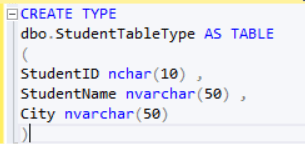
- You need create a “Table-Valued Type” (i.e.,StudentTableType from below scenario) with the structure similar to your Table (i.e., Student table from below scenario).
Steps to implement Option 2:
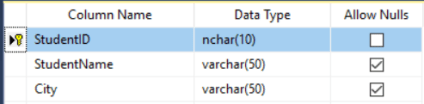
To simplify the explanation, I am taking a ‘Student’ table with 3 columns.
- Create ‘Student’ Table
- Create a ‘User-Defined Table Type’ (i.e., ‘StudentTableType‘) with ‘Student’ columns.
- Note: You don’t need to include all columns. Add columns only you need to update.
- Create a Stored Procedure with StudentTableType as Parameter

- In the Console, populate a ‘Data Table’ with ‘Student’ records as ‘Data Row’
tableStudents = new DataTable(“Student”);
tableStudents.Columns.Add(“StudentID”, typeof(string));
tableStudents.Columns.Add(“StudentName”, typeof(string));
tableStudents.Columns.Add(“City”, typeof(string));// Add ‘Student’ data as Rows to the Data Table
DataRow rowStudent = tableStudents.NewRow();
rowStudent[“StudentID”] = “RJ001”
rowStudent[“StudentName”] = “Rajeev”;
rowStudent[“City”] = “Hyd”;//Add the Data Row to Table
tableStudents.Rows.Add(rowStudent);
- Execute the Stored Procedure from Console by Passing ‘DataTable’ (i.e.,tableStudents) as Parameter
using (SqlConnection connection = ConnectionManager.SQLConnection)
{
SqlCommand cmdUpdateStudents = new SqlCommand(“BulkUpdateStudents”, connection)
{
CommandType = CommandType.StoredProcedure
};SqlParameter tvpParam = cmdUpdateStudents.Parameters.AddWithValue(“@tvpStudents”, tableStudents);
tvpParam.SqlDbType = SqlDbType.Structured;cmdUpdateStudents.ExecuteNonQuery();
}




![[Step by Step] Beginner : Create a PCF control and add it to a custom page](https://rajeevpentyala.com/wp-content/uploads/2024/12/image-49.png)
 Rajeev Pentyala – Technical Blog on Power Platform, Azure and AI
Leave a comment