In one of our integration requirements, we had to read the ‘List<>’ collection values, which was set in ‘Script Task’ control and pass to ‘Execute SQL Task’ control.
In this article I am going to list out the step by step process to set and get the ‘List<>’.
Assume that you have a collection List<string> which holds ‘Product Names’
var listProducts = new List<string>() {“Product1″, ” Product2″, ” Product3″};
Lets see how to loop through and read the ‘Product names’ and pass to ‘Execute SQL Task’.
Required SSIS components:
- A SSIS ‘Variable’ (i.e., varProducts) of type ‘Object’ to set the ‘List<>’ object in ‘Script Task’ control

- A SSIS ‘Variable’ (i.e., varProductName) of type ‘String’ to set the ‘Product Name’ for each List<> value.

- ‘Foreach Loop container’ to parse and read the ‘List<>’
Steps:
- Choose ‘varProducts’ as ‘ReadWriteVariables’
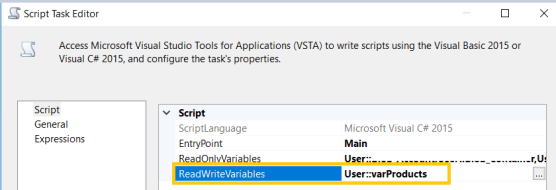
- In ‘ScriptTask’ set ‘listProduct’ object to ‘varProducts’ variable.
- var listProducts = new List<string>() {“Product1″, ” Product2″, ” Product3″};
- Dts.Variables[“User:: varProducts”].Value = listProducts ;
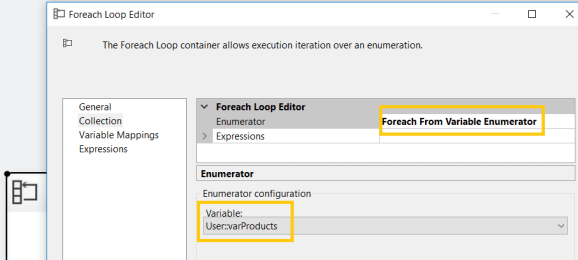
- In ‘Foreach Loop container’,
- Choose ‘Enumerator’ as ‘Foreach From Variable Enumerator’
- Enumerator Variable as ‘User:varProducts’
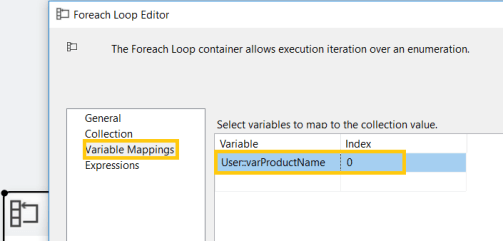
- As the ‘List’ contain ‘Product Name’ collection, read the ‘Product Name’ to ‘varProductName’ variable. ‘Index’ 0 denotes, first value in collection (i.e., Product Name’.
- As the final step, In ‘Execute SQL Task’, map the ‘varProductName’ variable to a ‘Parameter’.
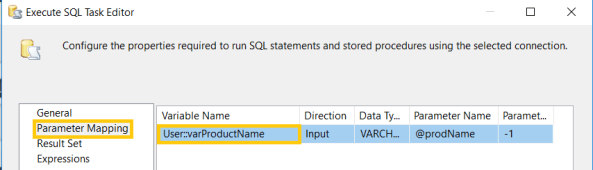
- In above screen, we are setting ‘@prodName’ parameter with ‘Product Name’ and ‘@prodName’ further used in ‘SQL Statement’ of ‘Execute SQL Task.
🙂



 Rajeev Pentyala – Technical Blog on Power Platform, Azure and AI
Leave a comment