I got an ask from one of my blog followers on how to set “Created On” field of a record, as it defaults to current date.
In this article I am going to explain various ways to set these values.
Override ‘Created On’ using Data Import:
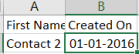
- Using ‘Data Import’, setting the “Created On” is straight forward and all you need is to add a column “Created On” in your .csv file and import.
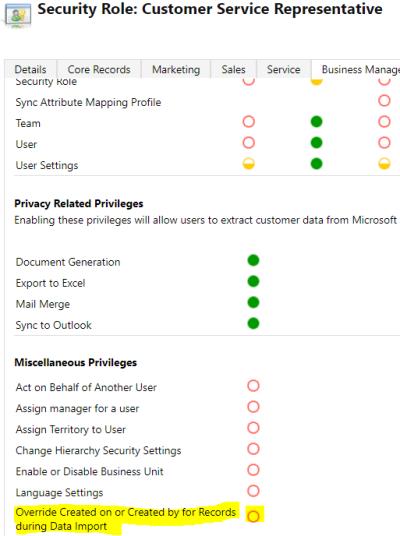
- For non-system admin users who import, make sure “Override Created on or Created by…” Privilege is checked in their Security Role.
Points to Ponder:
- Even though the privilege “Override Created on or Created by for records during data import” name suggests overriding “Created by” field but we cannot override “Created by” via Data Import.
Override ‘Created On’ using SDK:
- Set the “overriddencreatedon” field to the date, which you want your “Created On” date as.
- Post the execution of code, “Created On” value will be overridden with the Date set in “overriddencreatedon” field and “overriddencreatedon” field will default to todays date.
- For example, today is “01-01-2017” and you want the “Created On” as “01-01-2016”
- Set “overriddencreatedon” to “01-01-2016”
- After code execution, “Created On” will set to “01-01-2016” and “overriddencreatedon” will be today (i.e., 01-01-2017)
Sample code:
Entity contact = new Entity(“contact”);
contact[“firstname”] = “Contact Migrated”;
contact[“overriddencreatedon“] = new DateTime(2016, 01, 01);
_service.Create(contact);
Override “Created On”,” Created By”,” Modified On”,” Modified By” using Plug-in:
- To Override the fields, we need to go for plug-in approach.
- Register a “PreOperationCreate” plug-in and set the fields.
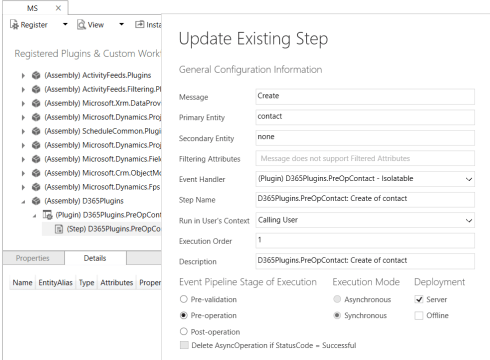
Plug-in Code:
public void Execute(IServiceProvider serviceProvider){
// Obtain the execution context from the service provider.
IPluginExecutionContext context = (IPluginExecutionContext)serviceProvider.GetService(typeof(IPluginExecutionContext));// The InputParameters collection contains all the data passed in the message request.
if (context.InputParameters.Contains(“Target”) && context.InputParameters[“Target”] is Entity)
{
// Obtain the target entity from the input parameters.
Entity TargetEntity = (Entity)context.InputParameters[“Target”];// Set date in Past
TargetEntity[“createdon”] = new DateTime(2016, 01, 01);
TargetEntity[“modifiedon”] = new DateTime(2016, 01, 01);
// Set the GUID of non-calling user
TargetEntity[“createdby”] = new EntityReference(“systemuser”, new Guid(“5BB6EF5F-6BCC-E711-A831-000D3A1BE051”));
TargetEntity[“modifiedby”] = new EntityReference(“systemuser”, new Guid(“5BB6EF5F-6BCC-E711-A831-000D3A1BE051”));
}
}
- Once this plug-in executes, values will get overridden with the passed values.

Points to Ponder:
- As you would have noticed, it requires a plug-in to set the ”Created By”,” Modified On”,” Modified By” fields which is an overhead.
- But this approach is extremely useful in “Data Migration” as this is common ask while migrating historical client data.
- Have the plug-in step enabled during “Data Migration” and deactivate post migration.
🙂




![[Step by Step] Beginner : Create a PCF control and add it to a custom page](https://rajeevpentyala.com/wp-content/uploads/2024/12/image-49.png)
 Rajeev Pentyala – Technical Blog on Power Platform, Azure and AI
Leave a comment