With the new Dynamics 365 Mobile client, we got a new API Xrm.Utility.getCurrentPosition which returns the current location coordinates.
This API only works with Mobile Client and referring this in Web Application would cause script error.
Pre-requisite:
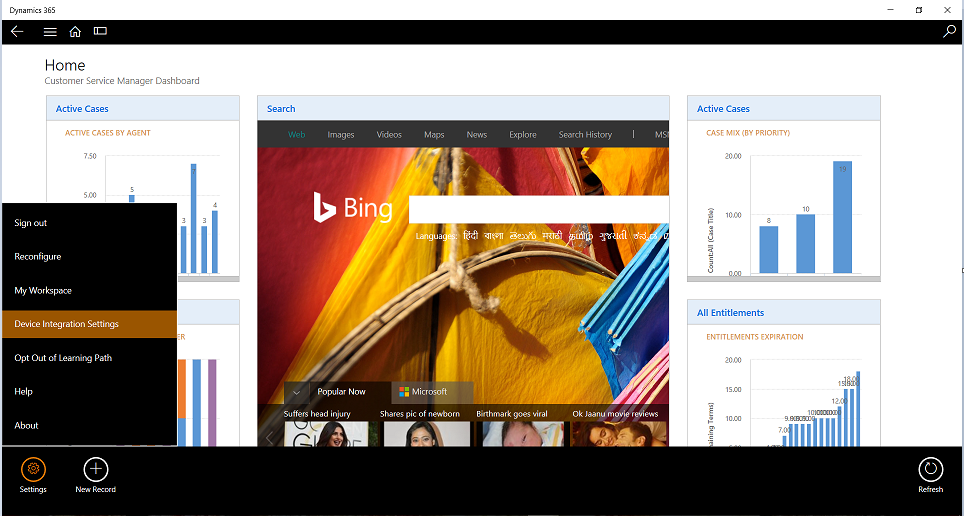
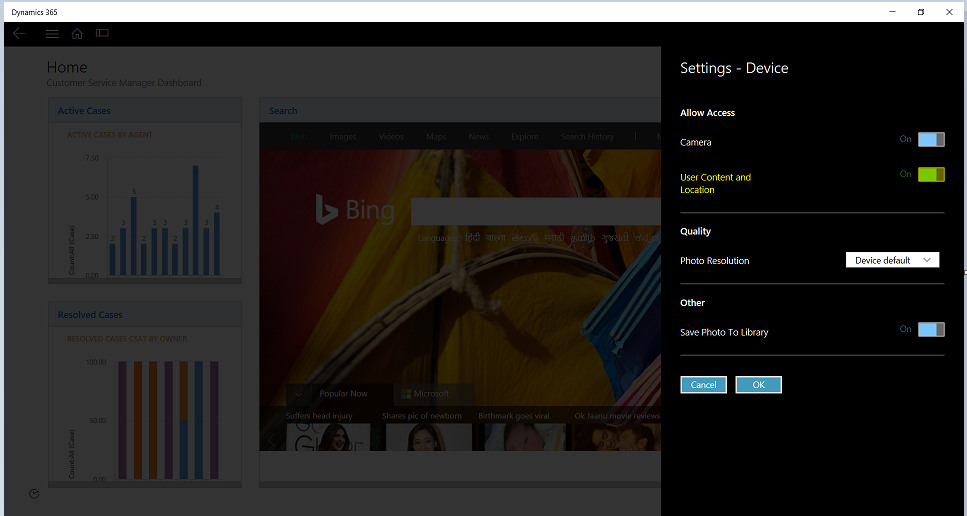
We need to Enable User Location setting on the device
- Go to Settings -> Device Integration Settings
- Enable “User Content and Location”
Script to get coordinates:
function onload() {
var isCrmForMobile = (Xrm.Page.context.client.getClient() == “Mobile”);if (isCrmForMobile) {
Xrm.Utility.getCurrentPosition().then
(function (location) {
Xrm.Utility.alertDialog(“Latitude: ” + location.coords.latitude +
“, Longitude: ” + location.coords.longitude);
},
function (error) {
Xrm.Utility.alertDialog(error.message);
})
}
}

HTML File to Read Coordinates and Show in Map

🙂



![[Step by Step] Beginner : Create a PCF control and add it to a custom page](https://rajeevpentyala.com/wp-content/uploads/2024/12/image-49.png)
 Rajeev Pentyala – Technical Blog on Power Platform, Azure and AI
Leave a comment