In Dynamics 365, a new ‘Rollup View’ relationship behavior has been introduced, which allows activities of the related entity would show up in ‘Activity Associated View’ of the primary entity.

To explain this better,
- I created a custom entity ‘Bike’ which has 1:N relationship with ‘Contact’ entity.
- I set ‘Relationship Behaviour’ -> ‘Rollup View’ as ‘Cascade All’

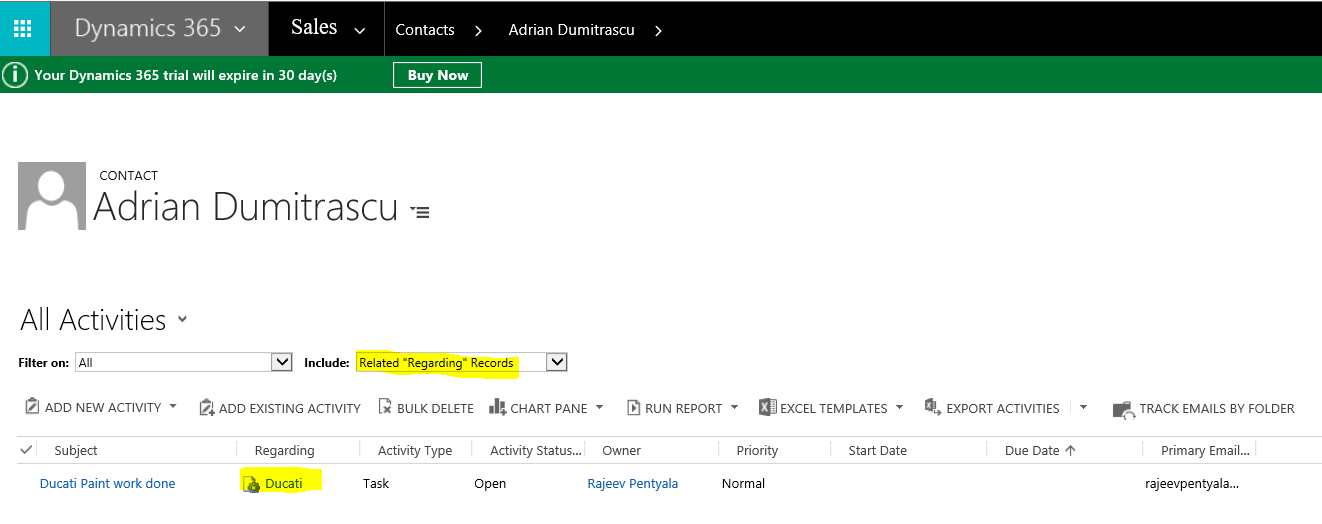
- I added a new Bike ‘Ducati’ to Contact ‘Adrian Dumitrascu’ and created a Task ‘Paint …’ for the ‘Ducati’ bike.

- As I set the ‘Rollup View’ as ‘Cascade All’ between ‘Contact’ and ‘Bike’, I get the Bike’s Task activity under my Contact’s ‘Activity Associated View’.
‘Rollup View’ can be set as ‘Cascade All’ only, if following conditions are met
- The primary and the related entity must have either I:N or N:l custom relationship.
- The flag can’t be set on any out-of-the-box system relationships.
- The primary entity for the relationship must be Account, Contact, or Opportunity, as these are the only entity forms where the Activity Associated View appears.
- The related entity must have ‘Activities’ options enabled in Customizations.
🙂



 Rajeev Pentyala – Technical Blog on Power Platform, Azure and AI
Leave a comment