In my SQL server I have a Login account ‘sa’ with ‘SQL Server Authentication’.

Even though all the properties provided properly, I was unable to login with below login exception.

Troubleshooting steps:
SQL Server Authentication:
- Open ‘SQL Server’ properties window

- Make sure SQL server’s ‘Server Authentication’ set to ‘SQL and Windows Authentication mode’

- Restart the SQL Services if you change.
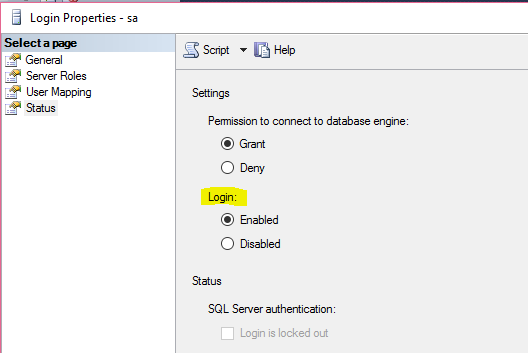
Enable Login for ‘sa’ account:
- ‘Login’ feature has to be enabled for ‘sa’ account
- Open the ‘sa’ account by double click.
- In the ‘Staus’ tab make sure ‘Login’ is enabled and set ‘Permission to connect to database engine’ to ‘Grant’
🙂


![[Step by Step] Beginner : Create a PCF control and add it to a custom page](https://rajeevpentyala.com/wp-content/uploads/2024/12/image-49.png)
 Rajeev Pentyala – Technical Blog on Power Platform, Azure and AI
Leave a comment